On 64-bit Windows, we have two different sets of Window Scripting Host (WSH), 32-bit or 64-bit. The defaults are located at C:\Windows\System32, where cscript.exe or wscript.exe (with GUI, e.g. message prompt) is used run the *.vbs or *.js WSH files. However, these are 64-bit, meaning that if you try to create a COM object (automation), you will get similar errors like the following. (Automation Server Can’t Create Objects).
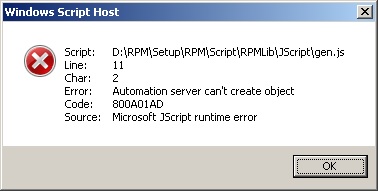
Well, when you want to deploy some scripts that require a 32-bit COM (Component Object Model) object, you don’t want the system end up showing this error dialog. However, you also don’t have the control over user’s preferences on which particular sets of cscript.exe or wscript.exe should be used to invoke running the scripting files (you can change the opening configuration by right-click-open with-and-choose the right ?script.exe).
When, what we can achieve here is to check whether which script engine is used at the begining of the script execution. If it is 32-bit, then carry on otherwise, show a information dialog, like this.
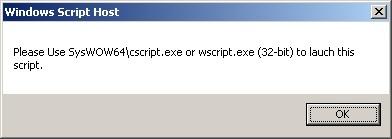
We can check WScript.FullName to see its scripting engine file path contains the word ‘syswow64’, this works for most cases, unless some one intentionally puts a 64-bit engine under this folder. WoW64 stands for Windows 32-bit on Windows 64-bit. If a engine is 32-bit, then it surely be able to create 32-bit COM object.
The following VBScript checks the engine file path and exit printing the above dialog if it seems to be a 64-bit engine, e.g. ‘C:\windows\system32\cscript.exe’.
Dim Mode
If Not IsEmpty(WScript) Then
	If (InStr(LCase(WScript.FullName), "syswow64")) Then
		'WScript.Echo "OK, It is in 32-bit"
		Mode = 0
	Else
		WScript.Echo "Please Use SysWOW64\cscript.exe or wscript.exe (32-bit) to lauch this script."
		WScript.Quit
	End If
Else
	'We don't have access to WScript, most-likely-we are using MS Script Control.
	Mode = 1
End If

' Set the corresponding Message Box prompt.
Sub MessageBox(str)
	If Mode = 0 Then
		WScript.Echo str
	Else
		Msgbox str
	End If
End Sub
The above script also sets the correct message prompt function. If WScript is not available (empty), it is likely that we are using MS Script Control, where WScript.Echo is not available, we must use the alternative, Msgbox.
However, translating the above into JScript is a bit lengthy. Let’s look at the code first.
(function () {
	var mode;
	try {
		if (WScript != undefined) {
			var path = WScript.FullName.toLowerCase();
			if (path.indexOf('syswow64') >= 0) {
				mode = 0;
			} else {
				WScript.Echo("Please Use SysWOW64\\cscript.exe or wscript.exe (32-bit) to lauch this script.");
				WScript.Quit();
			}
		} else {
			mode = 1;
		}
	} catch (err) {
		mode = 1;
	}
	var obj = new ActiveXObject("WScript.Shell");
	function MessageBox(str) {
		if (mode == 0) {
			WScript.Echo(str);
		} else {
			obj.popup(str);
		}
	}
})();
We have to wrap the check in try … catch because if not, MS JScript Engine will complain that WScript is not defined under MS Script Control. As JScript does not provide inbuilt Msgbox as VBScript does, it can create COM object WScript.Shell to use its popup function to prompt a message, which can also be used in VBScript.
–EOF (The Ultimate Computing & Technology Blog) —
680 wordsLast Post: Node.js Tutorial - 4 Reading File in node.js
Next Post: Happy Valentine's Day, another heart equation
Hi Shobhit,
Even I am facing the same challenge as yours. Did you come across any solution?
Hi,
I have an excel macro developed in 32 bit version of Office. Now i want the same macro to run in the 64-bit version of office. How do i do that? How do i make the excel macro run on 32-bit version of vbscript?
You can use the WScript.Shell COM object to Run the external command, and specify the 32-bit of cscript.exe e.g. C:\Windows\SysWow64\cscript.exe However, this requires the scripts written in external *.vbs file.
I guess that is not completely what you want e.g. You might want to interact with the current open sheet in Excel. However, as independent *.vbs script files, you can also create Excel.Application object to handle the excel files without requiring Excel to open.
No, i really need to open an excel file and run the vbscript as macro. The macro is actually for fetching data from HP ALM tool. So for that i must login first. And thats where i am getting stuck.
I guess the only way you can do is to install 32-bit Excel instead of 64-bit.