您将学到什么?
Chrome 浏览器支持添加书签, 通过这个教程您将:
需求
Chrome 浏览器支持添加书签, 通过这个教程您将:
- 安装并使用Chrome浏览器
- 最基本的Javascript知识
难度
中等偏易
教程
您可以通过以下步骤打开 书签显示:
- 在地址栏里输入 chrome://settings/
- 勾上 Show bookmarks bar
书签可以是网址, 也可以是Javascript 小程序. 添加一个书签, 您需要:
- 在地址栏输入 chrome://bookmarks/
- 右键点击右上角的 Add New Bookmark
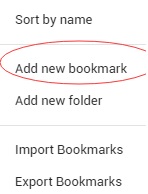
add-new-bookmark
然后在弹出的添加书签窗口, 输入书签名称和内容, 如果是Javascript小程序则代码需要以 javascript: 开始.
比如, 以下会添加一个名叫 test 的书签, 并且, 如果你点击它, 它会导到我的 SteemIt 页面
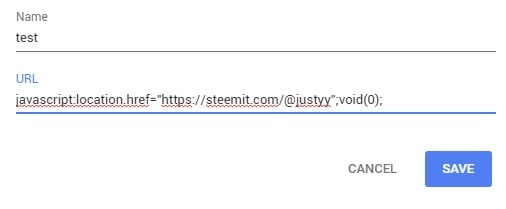
sample-bookmark-chrome-javascript
获取能量和等级的书签程序
了这个例子, 我写了两个API
以下API会获取指定用户的SteemIt等级:
https://helloacm.com/api/steemit/account/reputation/?id=justyy
以下API会获取指定用户的SteemIt能量(Voting Power):
https://helloacm.com/api/steemit/account/vp/?id=justyy
接下来就是设计了, 当我们第一次运行这个书签, 程序会让我们输入ID, 然后书签就会记住了. 这可以通过 Chrome 的 localStorage 对象. 当有了这个ID 我们就可以通过API依次获取我们需要的数据.
第一部分的代码为:
var steem_id = localStorage.getItem("steem_id");
if (steem_id == null) {
    steem_id = prompt("Please enter your SteemId");
    localStorage.setItem("steem_id", steem_id);
}
然后, 我们可以通过 fetch 和 then (Javascript Promises) 把事件串联起来.
if (steem_id != null) {
    fetch('https://helloacm.com/api/steemit/account/reputation/?id=' + steem_id, {mode: 'cors'})
    .then(validateResponse)
    .then(readResponseAsJSON)
    .then(function(rep) {
        fetch('https://helloacm.com/api/steemit/account/vp/?id=' + steem_id, {mode: 'cors'})
        .then(validateResponse)
        .then(readResponseAsJSON)
        .then(function(vp) {
            var msg = "ID: " + steem_id + "\n" +
                      "Reputation: " + rep + "\n" +
                      "Voting Power: " + vp;
            alert(msg);
        })
    })
}
validateResponse 函数用于检查API是否返回正确.
function validateResponse(response) {
  if (!response.ok) {
    throw Error(response.statusText);
  }
  return response;
}
readResponseAsJSON把数据转换成JSON格式.
function readResponseAsJSON(response) {
  return response.json();
}
然后, 您只需要把整段JAVASCRIPT代码(记得在最开始添加javascript:)拷贝到书签内容即可.
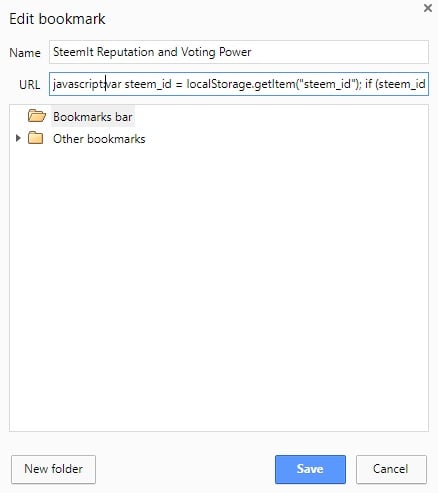
edit-bookmark-js-chrome
来, 测试一下(第一次会要求输入ID):
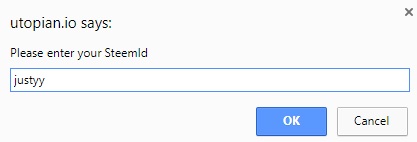
utopian-asks-for-steem-id
然后, 只需要点击一次就可以获得能量和等级.
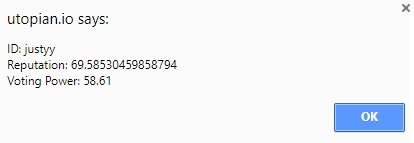
utopian-says-reputation-voting-power-steemit
整段代码
javascript:
var steem_id = localStorage.getItem("steem_id");
if (steem_id == null) {
    steem_id = prompt("Please enter your SteemId");
    localStorage.setItem("steem_id", steem_id);
}

function readResponseAsJSON(response) {
  return response.json();
}

function validateResponse(response) {
  if (!response.ok) {
    throw Error(response.statusText);
  }
  return response;
}

if (steem_id != null) {
    fetch('https://helloacm.com/api/steemit/account/reputation/?id=' + steem_id, {mode: 'cors'})
    .then(validateResponse)
    .then(readResponseAsJSON)
    .then(function(rep) {
        fetch('https://helloacm.com/api/steemit/account/vp/?id=' + steem_id, {mode: 'cors'})
        .then(validateResponse)
        .then(readResponseAsJSON)
        .then(function(vp) {
            var msg = "ID: " + steem_id + "\n" +
                      "Reputation: " + rep + "\n" +
                      "Voting Power: " + vp;
            alert(msg);
        })
    })
}
英文: How to Write Chrome Bookmark Scripts? – Step by Step Tutorial with a SteemIt Example
本文一共 450 个汉字, 你数一下对不对.上一篇: 给STEEM中文微信群加了个机器人
下一篇: SteemIt Utopian 乌托邦怎么玩? (Bug 提交报告) | 我媳妇上了 github 的 issue report

