AWS Lambda
AWS Lambda是无服务Serverless的领导者, 同类产品有 CloudFlare 的 Worker, 微软的 Azure Function. 我们用Lambda可以省去维护升级服务器的费用的时间. 并且Serverless的本身都是非常可扩展(水平)的.
负载均衡 Load Balancer
负载均衡Load Balancer服务器的目的是把流量转发(Route)到较空闲的服务器的, 以避免单服务器过载和单点错误(Single Point of Failure).
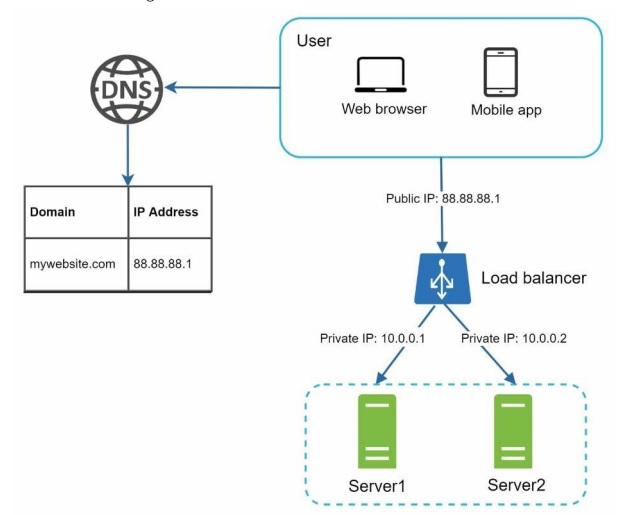
和CloudFlare Worker一样, 我们可以用AWS Lambda做一个Serverless的负载均衡服务器.
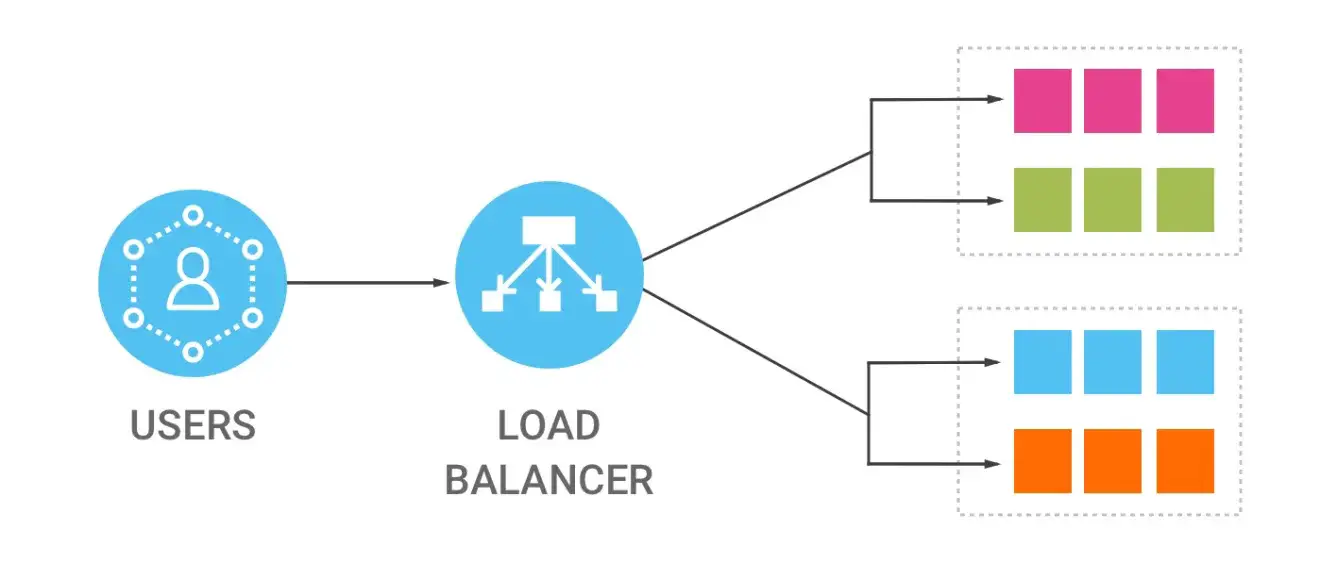
load-balancer
基于AWS Lambda的负载均衡服务器
LB采用的均衡算法可以是基于DNS, Round-robin, 随机, 按照IP哈希运算, 或者最小load等. 我们这里采用的是响应最快的服务器. 这是比较简单的方式: 负载均衡服务器(Lambda)再接到请求的同时会即时给API服务器发送一个PING请求, 那么最先返回(PING最快)的那个服务器将获得这次请求. 接下来LB会立马把用户的请求转发给该服务器并等待结果.
我们还可以实现一个Canary程序每分钟给这些API服务器发送PING请求并将状态记录在数据库中, 当Lambda得到请求时则会从数据库中得到最合适(最健康)的那个服务器地址并将请求转发.
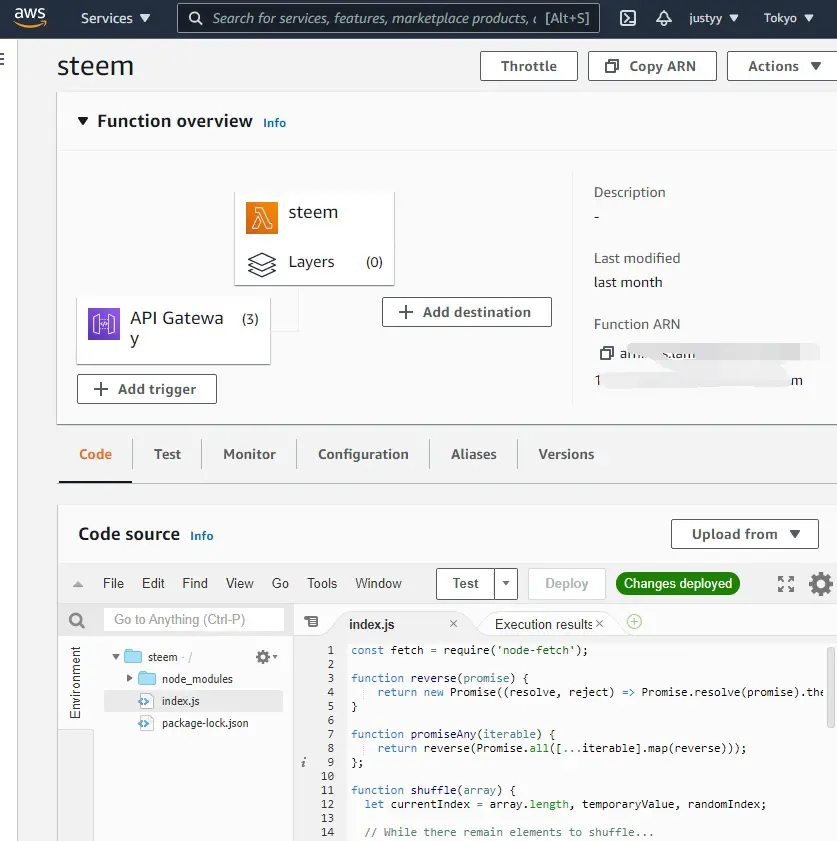
创建一个Lambda函数(可以用NodeJs来实现), 我们需要使用到node-fetch库. 我们需要定义几个方法来得到PromiseAny方法, 也就是返回最快成功的那个Promise.
const fetch = require('node-fetch');

function reverse(promise) {
    return new Promise((resolve, reject) => Promise.resolve(promise).then(reject, resolve));
}

function promiseAny(iterable) {
    return reverse(Promise.all([...iterable].map(reverse)));
};
把数组打乱的函数.
function shuffle(array) {
  let currentIndex = array.length, temporaryValue, randomIndex;

  // While there remain elements to shuffle...
  while (0 !== currentIndex) {

    // Pick a remaining element...
    randomIndex = Math.floor(Math.random() * currentIndex);
    currentIndex -= 1;

    // And swap it with the current element.
    temporaryValue = array[currentIndex];
    array[currentIndex] = array[randomIndex];
    array[randomIndex] = temporaryValue;
  }

  return array;
}
API服务器列表:
let nodes = shuffle([
  "https://api.steemit.com",
  "https://api.justyy.com",
  "https://api.steemitdev.com",
]);
请求API服务器得到版本号:
async function getVersion(server) {
  return new Promise((resolve, reject) => {
    fetch(server, {
      method: "POST",
      headers: {
        'Content-Type': 'application/json'
      },
      body: JSON.stringify({"id":0,"jsonrpc":"2.0","method":"call","params":["login_api","get_version",[]]})
    }).then(response => {
      resolve(response.text());
    }).catch(function(error) {
      reject(error);
    });
  });
}
实现一个PING函数来得到最快的那个服务器:
async function contactServer(server) {
  return new Promise((resolve, reject) => {
    fetch(server, {
      method: "GET"
    }).then(response => {
      if (!response.ok) {
        reject({
            "server": "",
            "error": response,
            "host": server
        });
      } else {
        resolve({
          "server": server,
        });
      }
    }).catch(function(error) {
      reject({
          "server": "",
          "error": error,
          "host": server
      });
    });
  });
}
把GET请求转发:
async function forwardRequestGET(apiURL) {
  return new Promise((resolve, reject) => {
    fetch(apiURL, {
      method: "GET",
      headers: {
        'Content-Type': 'application/json'
      },
      redirect: "follow"
    }).then(response => {
      resolve(response.text());
    }).catch(function(error) {
      reject(error);
    });
  });
}
POST转发需要BODY:
async function forwardRequestPOST(apiURL, body) {
  return new Promise((resolve, reject) => {
    fetch(apiURL, {
      method: "POST",
      redirect: "follow",
      headers: {
      'Content-Type': 'application/json'
      },
      body: body
    }).then(response => {
      resolve(response.text());
    }).catch(function(error) {
      reject(error);
    });
  });
}
AWS Lambda的入口:
exports.handler = async(event, context) => {
  const servers = [];
  nodes = shuffle(nodes);
  for (const server of nodes) {
    servers.push(contactServer(server));
  }
  const load = await promiseAny(servers);
  const forwardedURL = load['server'];
  let method = "POST";
  if (event["http-method"]) {
      method = event["http-method"].toUpperCase();
  }
  let result;
  let res;
  let version = "";
  try {
    version = await getVersion(load['server']);
  } catch (e) {
    version = JSON.stringify(e);
  }
  console.log("server = ", load['server']);
  console.log("version = ", version);
  let body = {};
  if (event["body-json"]) {
    body = event["body-json"];
    body = JSON.stringify(body);
    if (body.length <= 2) {
      method = "GET";
    }
  } else {
    method = "GET";
  }
  try {
    if (method === "POST") {
        result = await forwardRequestPOST(forwardedURL, body);
    } else if (method === "GET") {
        result = await forwardRequestGET(forwardedURL);
    } else {
        return {
            statusCode: 405,
            statusText: 'Method Not Allowed',
            headers: {
                'Access-Control-Allow-Origin': '*',
                'Cache-Control': 'max-age=3600',
            }
        };
    }
  } catch (e) {
    return {
        statusCode: 500,
        headers: {
            'Content-Type': 'application/json',
            'Access-Control-Allow-Origin': '*',
            'Cache-Control': 'max-age=3',
            'Version': version,
            'Error': JSON.stringify(e)
        }
    };
  }
  // Adding meta information before forwarding to requester.
  result = JSON.parse(result);
  try {
    result["__version__"] = JSON.parse(version);
  } catch (e) {
    result["__version__"] = version;
  }
  result["__server__"] = load['server'];
  return result;
};
AWS API Gateway
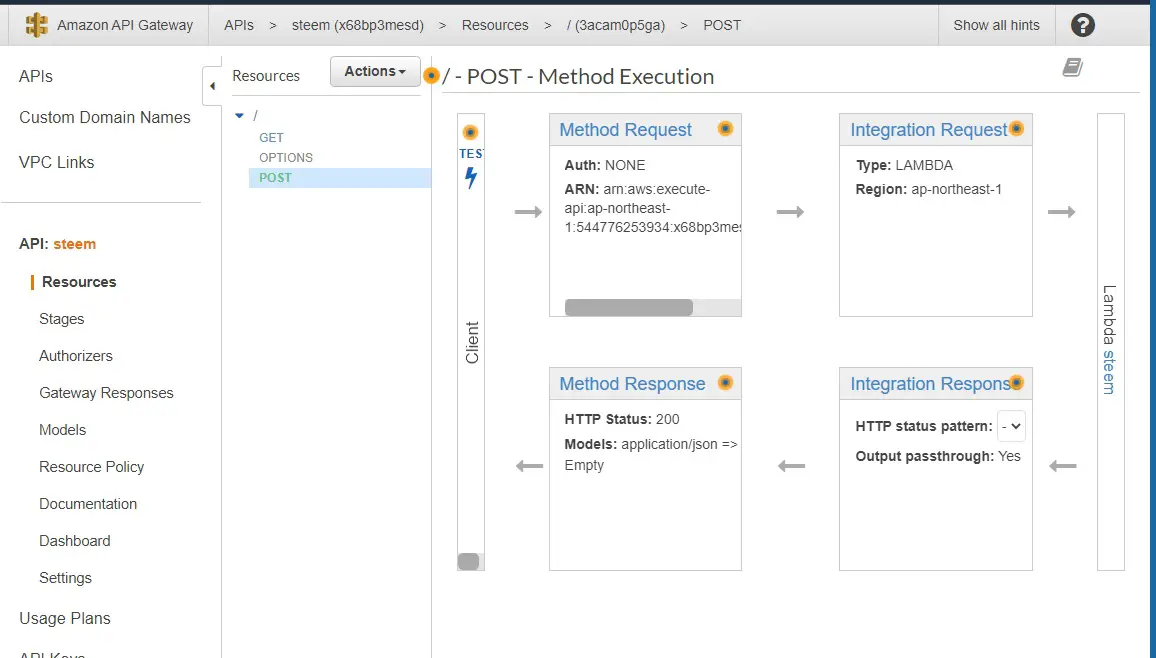
定义完Lambda, 我们需要把它用AWS API Gateway来连接起来. 我们需要在 Integration Request 设置一下参数 “application/json” 的 Mapping.
##  See http://docs.aws.amazon.com/apigateway/latest/developerguide/api-gateway-mapping-template-reference.html
##  This template will pass through all parameters including path, querystring, header, stage variables, and context through to the integration endpoint via the body/payload
#set($allParams = $input.params())
{
"body-json" : $input.json('$'),
"params" : {
#foreach($type in $allParams.keySet())
    #set($params = $allParams.get($type))
"$type" : {
    #foreach($paramName in $params.keySet())
    "$paramName" : "$util.escapeJavaScript($params.get($paramName))"
        #if($foreach.hasNext),#end
    #end
}
    #if($foreach.hasNext),#end
#end
},
"stage-variables" : {
#foreach($key in $stageVariables.keySet())
"$key" : "$util.escapeJavaScript($stageVariables.get($key))"
    #if($foreach.hasNext),#end
#end
},
"context" : {
    "account-id" : "$context.identity.accountId",
    "api-id" : "$context.apiId",
    "api-key" : "$context.identity.apiKey",
    "authorizer-principal-id" : "$context.authorizer.principalId",
    "caller" : "$context.identity.caller",
    "cognito-authentication-provider" : "$context.identity.cognitoAuthenticationProvider",
    "cognito-authentication-type" : "$context.identity.cognitoAuthenticationType",
    "cognito-identity-id" : "$context.identity.cognitoIdentityId",
    "cognito-identity-pool-id" : "$context.identity.cognitoIdentityPoolId",
    "http-method" : "$context.httpMethod",
    "stage" : "$context.stage",
    "source-ip" : "$context.identity.sourceIp",
    "user" : "$context.identity.user",
    "user-agent" : "$context.identity.userAgent",
    "user-arn" : "$context.identity.userArn",
    "request-id" : "$context.requestId",
    "resource-id" : "$context.resourceId",
    "resource-path" : "$context.resourcePath"
    }
}
费用
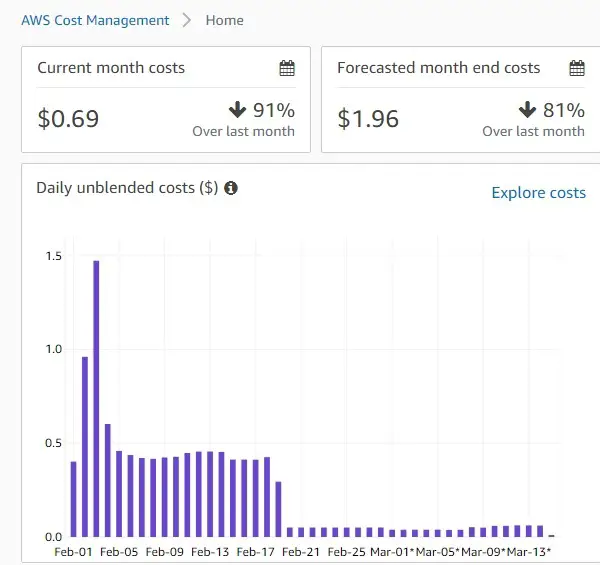
之前使用的是 AWS 免费一年的EC2 t2.micro, 可以看到 费用省下了不少. 现在用 Lambda 一天只需要0.05美元. 而且我也不用再自己去维护和升级服务器了.
另一好处就是 Lambda 本身的扩展性就很强, 再多的访问再多的流量也不怕(只要你付得起Lambda费用)
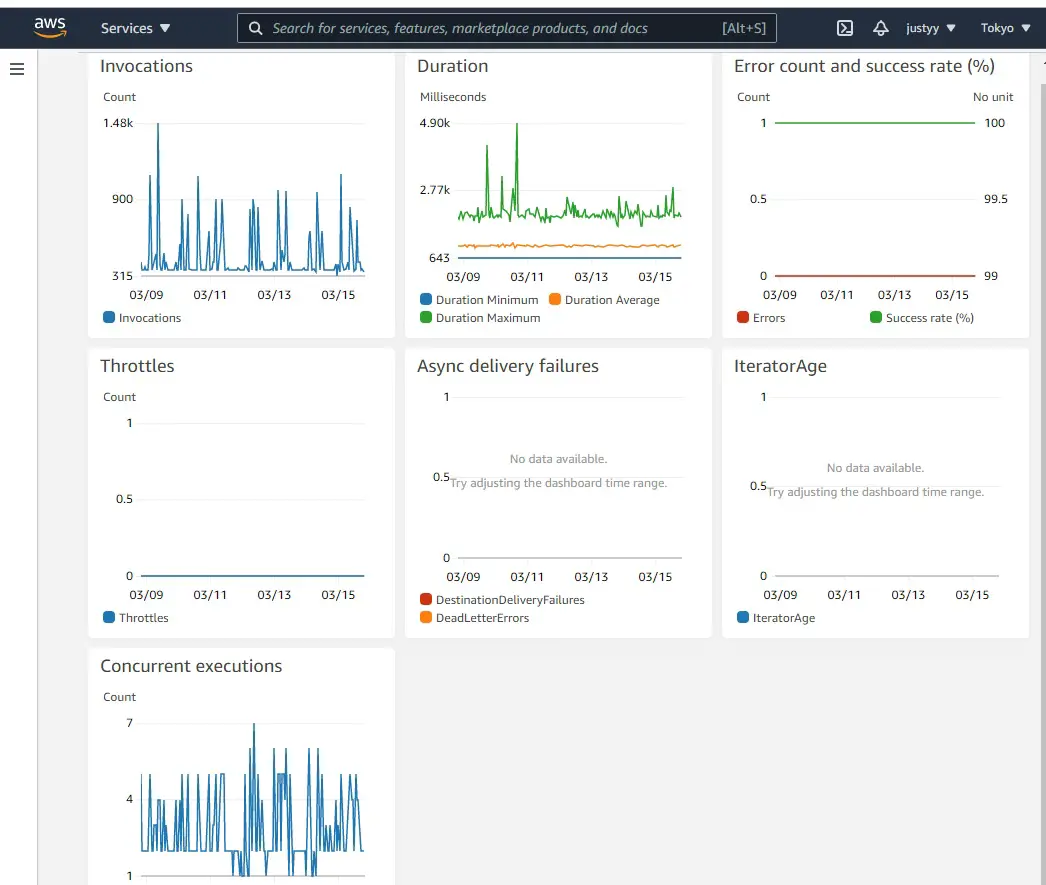
我们还可以在AWS Lambda那里看到一些访问的数据统计.
同步到英文博客: Develop a Load Balancer using AWS Lambda
本文一共 569 个汉字, 你数一下对不对.上一篇: 给孩子零花钱培养孩子正确的金钱观价值观
下一篇: 推荐一款好用的键盘: Keychron K8 有线无线两用机械键盘

