You can easily use Shell.Application to invoke methods related to Windows such as minimize all windows. For example, if you require users choosing a folder you can invoke the method BrowseForFolder.
The dialog looks like the following, simple but effective. Just a few lines and you will have a GUI without too much effort.
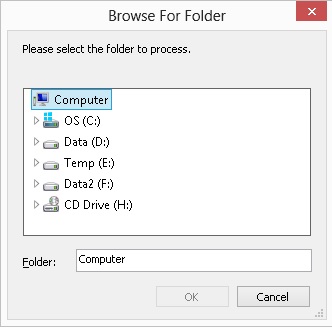

The sample code is quite simple:
' Declare Option Constants
Const BIF_EDITBOX = &H10
Const BIF_NONEWFOLDER = &H0200
Const BIF_RETURNONLYFSDIRS = &H1

Function Browse4Folder(strPrompt, intOptions, strRoot)
	Dim objFolder, objFolderItem, objShell
	Set objShell = CreateObject("Shell.Application")
	Set objFolder = objShell.BrowseForFolder(0, strPrompt, intOptions, strRoot)
	If (objFolder Is Nothing) Then
		Browse4Folder = ""
	Else
		Set objFolderItem = objFolder.Self
		Browse4Folder = objFolderItem.Path
		Set objFolderItem = Nothing
		Set objFolder = Nothing
	End If
	Set objShell = Nothing
End Function

strPrompt = "Please select the folder to process."
intOptions = BIF_RETURNONLYFSDIRS + BIF_EDITBOX + BIF_NONEWFOLDER

' Return the path, e.g. C:\
strFolderPath = Browse4Folder(strPrompt, intOptions, "")
Now, you can copy this function to your library for the future use.
–EOF (The Ultimate Computing & Technology Blog) —
Last Post: Exit While Loop in VBScript / Trim Return Carriage and Tab
Next Post: Codeforces: 347 B. Fixed Points