Introduction to Logo Turtle
LogoTurtle is the first Chrome Extension for Turtle Graphics.
Previous Contributions
- v0.0.4: LogoTurtle: Make Variables and Comments
- v0.0.3: Turtle Graphics Programming Update: Adding text, jump, dot, fontsize, download as png
- v0.0.2: LogoTurtle v0.0.2: ShowTurtle, HideTurtle, Color, Width and Help.
- v0.0.1: Teach Your Kids Programming – The First Logo Interpreter (Turtle Graphics) in Chrome Extension!
Turtle Programming v0.0.5 New Features
This Commit supports IF/ELSE and STOP.
In previous versions, the LOOP program flow is supported by keyword REPEAT and the most important IF/ELSE is now implemented in this version.
Screenshots
This is how things get a little bit interesting and I believe now you can have your imaginations fly.
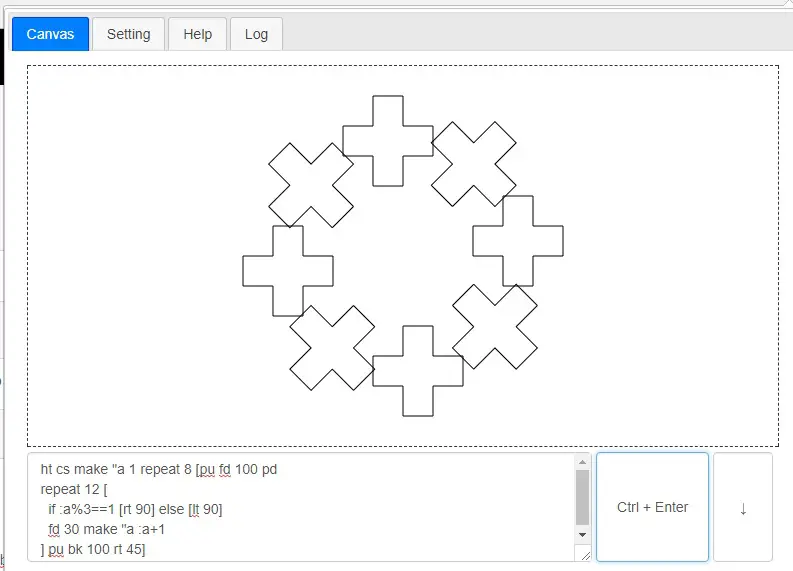
turtle-programming-if-else
LOGO: Source code.
ht cs make "a 1 repeat 8 [pu fd 100 pd
repeat 12 [
  if :a%3==1 [rt 90] else [lt 90]
  fd 30 make "a :a+1
] pu bk 100 rt 45]
How to Implement IF/ELSE in Logo/Javascript?
The IF part is similar to REPEAT and all we need to do is to parse the ELSE part.
case "if":
expr = this.evalVars(word_next, true);
try {
    word_next = eval(expr);
} catch (e) {
    this.pushErr(LOGO_ERR_EVAL, expr);
    return false;
}
if ((word_next === '')) {
    this.pushErr(LOGO_ERR_MISSING_EXP, word_next);
    return false;
}
find_left = getNextWord(s, y.next, U);
if (find_left.word != '[') {
    this.pushErr(LOGO_ERR_MISSING_LEFT, find_left.word);
    return false;
}
repeat_left = find_left.next;
find_right = repeat_left + 1;
nested = 1;
// need to match [ and ]
while (find_right < U) {
    if (s[find_right] == '[') {
        nested ++;
    }
        if (s[find_right] == ']') {
            nested --;
            if (nested == 0) {
                break;
            }
        }
        find_right ++;
}
if (find_right >= U) {
    this.pushWarning(LOGO_ERR_MISSING_RIGHT);
}
let ifelse = word_next;
if (ifelse) {
    // if body
    if (!this.run(s, repeat_left, find_right, depth + 1)) {
        return false;
    }
}
find_else = getNextWord(s, find_right + 1, U);
if (find_else.word.toLowerCase() == 'else') {
    let else_block = getNextBody(s, find_else.next, U);
    if (else_block.ch != '[') {
        this.pushErr(LOGO_ERR_MISSING_LEFT, else_block.ch);
        return false;
    }
    if (!ifelse) {
        // else body
        if (!this.run(s, else_block.left, else_block.right, depth + 1)) {
            return false;
        }
    }
    i = else_block.right + 1;
} else {
    // no else block
    i = find_right + 1;
}
break;
Roadmap of Chrome Extension: Logo Turtle
- Add Functions
- Add IF/THEN/ELSE
- Add Variables
- Add Colors
- Add MoveTo
- Add PrintText
- Add Circle
- Add Arc
- Add Eraser
- Add Fill
- Save As Picture
- Save As Program
- Comments
- Add Recursion Support
- Add Global/Local Scopes
- etc. etc.
Technology Stack
If an App can be written in Javascript, eventually it will be written in Javascript.
Chrome Webstore
Install the Turtle Programming for Kids Now!
Contribution Welcome
Github: https://github.com/DoctorLai/LogoTurtle
- Fork it!
- Create your feature branch: git checkout -b my-new-feature
- Commit your changes: git commit -am ‘Add some feature’
- Push to the branch: git push origin my-new-feature
- Submit a pull request.
–EOF (The Ultimate Computing & Technology Blog) —
Last Post: The SteemIt Discord Bot with PHP Source Code
Next Post: Turtle Programming v0.0.6: Adding Circle, MoveTo, Turn and Screen!