TLDR; I’ve now 27 servers, and some are low-cost or even free. For example, oracle gives you 2 free VMs, and I run a raspberry pi 4b home. I run microservices on small VMs. I put raspberry pi in a shoe closet, connect it to router. and I overclocked the CPUs from 1.4 GHz to 2.2 GHz, the temperature stays between 30 to 40 degrees with 2 fans.
Re-using the Raspberry PI 4b as a mini server
I have three or four Raspberry Pi devices at home, most of which have been gathering dust. One of them is an all-in-one keyboard-style model, similar to the retro Subor learning machines. I used it a few years ago to introduce computing to my child. Among all, it has the best specs. The second most powerful is a Raspberry Pi 4B, with a quad-core CPU and 4GB of RAM.
Raspberry Pi is a symbol of British technological innovation. Its headquarters are in Cambridge, and the only official physical retail store in the UK is located in the Grand Arcade shopping center in Cambridge. There’s even a purchase limit — one device per person per visit.


That is where the raspberry pi 4b server is – hidden in the shoe closet.
A while ago, my child mentioned several times that he wanted to play with a Raspberry Pi. I’m not sure where he saw it or if it was just a fleeting interest. So, I dug out the Pi 4B from the garage, installed it on the shoe cabinet near the entrance, and added a small fan for cooling.


Mounted a big CPU fan to allow overclocking, and then also added an extra USB small fan (5W) to cool it down further by 5 degrees.
I connected it directly to the router via Ethernet. After waiting 10 to 20 minutes without being able to SSH into it remotely, I thought it might be broken. But after dinner, I checked again and saw that it had been assigned an IP address by the router. I logged in with the default username and password — everything worked fine.
I created a new user account for my child and taught him some basic Linux commands. I also ran apt update && apt upgrade to update the system. Later, I attached a 1TB external SSD to the Pi, though it’s not being used for much at the moment.
I deployed a Node.js script using PM2 to monitor article publishing events on the STEEM blockchain and insert related bot commands into a MySQL database. I run similar lightweight programs on five servers located in different regions to ensure redundancy. This greatly improves the system’s availability — the chances of all servers going down at the same time are virtually zero.
Initially, I used a random USB power adapter, but the CPU was constantly throttled due to insufficient power. Eventually, I found the official 5V/3.1A Raspberry Pi power supply in a drawer, and the problem was instantly resolved. I even overclocked all four cores to 2.2GHz (up from the default 1.4GHz). To overclock, you would need a stable power supply to Raspberry Pi and also a CPU Fan to cool it down. The normal working temperature of a Raspberry Pi 4b is from 40 to 80 degrees.
This little “server” has now been running at home for three to four weeks without any issues. I wrote the following Bash script for system monitoring and added it to the Nezha monitoring platform:
#!/bin/bash
echo "USER=$USER"
echo ""

echo "- CPU -"
for cpu in /sys/devices/system/cpu/cpu[0-9]*/cpufreq/scaling_cur_freq; do
    cpu_num=$(echo $cpu | grep -o 'cpu[0-9]*' | grep -o '[0-9]*')
    freq=$(cat $cpu | awk '{printf "%.2f", $1/1000000}')
    echo "CPU$cpu_num: ${freq} GHz"
done

vcgencmd measure_temp
vcgencmd measure_volts
vcgencmd get_throttled

echo ""
echo "- Disk - "
df -h

echo ""
echo "- Memory - "
free -m

echo ""
echo "- Current Users - "
w

echo ""
echo "- Uptime - "
uptime
If you were to rent a similar host from a cloud provider, it would probably cost around $10 to $20 per month based on the specs. However, since this is ARM-based, it’s typically 20–30% cheaper than x86/64 servers.


A simple bash script to monitor the health/status of the raspberry pi 4b. e.g. watch -n 1 ./monitor-pi.sh


Raspberry PI 4b has 4 cores (1.4 GHz which can be overclocked to 2.2GHz if power is good and cooling is good). It has 4 GB RAM.


Added Raspberry PI 4b server to Nezha Monitor

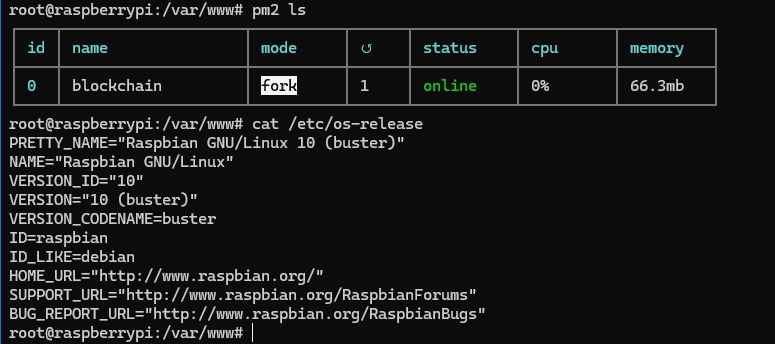
Raspberry Pi 4b is good enough to run a small nodejs program on PM2.
I cut a hole at the back of the shoe closet to allow cables to pass through (the messy cables are hidden). The Raspberry Pi 4b mini server is actually quite stable, running for weeks without problems. The Raspberry Pi 4b is connected to Wiress Router directly for a stable network connection.


I cut a hole at the back of the shoe closet to allow cables to pass through. The Raspberry Pi 4b mini server is actually quite stable, running for weeks without problems.
Raspberry Pi
- Turn Your Raspberry Pi into a Family Network Drive: 2TB WD Hard Drive Setup for Kids' Macs
- The Latest Raspberry PI 5 Comes with Up to 16GB of RAM, but It's a Bit Pricey
- Turning a Dusty Raspberry PI into a Home Server for Blockchain Monitoring
- Visiting The Raspberry Shop in Cambridge UK
- Overclocking ARM CPU of Raspberry PI 4 and 400 with Temperature Cooling Measures
- BASH Script to Monitor the CPU Frequency and Temperature on Raspberry PI
- All-In-One Raspberry PI 400 Kit - Personal Computer Kit with Raspbian OS
- How to Monitor the CPU Temperature of Raspberry PI using Python Script?
- Use PHP Script to Monitor Temperature and Uptime for Raspberry PI in the Browser
- Review: Raspberry PI B Plus Model
- Different Approaches to Reduce the CPU Temperature of Raspberry PI
- Test SD Card Speed on Raspberry PI
- Remote Desktop Connection for Raspberry PI (xrdp)
- Using a external USB cooler fan to drop temperature of Raspberry PI (Model B) from 51 degrees downto 40 degrees for just ten minutes
- How to Get the CPU Temperature on Raspberry PI using BASH Script?
- Apache Server (PHP + MySQL) on Raspberry PI
See also: My raspberry pi 4b runs some microservices
–EOF (The Ultimate Computing & Technology Blog) —
Last Post: Understanding dynamic_cast in C++: Safe Downcasting Explained
Next Post: Teaching Kids Programming - Number of Equivalent Domino Pairs (Hash Table + Combination)