The RDTSC is the IA-32/IA-64 (or x86/x64) instruction that loads the current value of the processors’ time stamp into EDX:EAX registers. RDTSC is short for “Read Time-Stamp Counter”. It returns the number of clock cycles since last reset.
The modern complier Visual Studio has implemented the compiler intrinsic so you don’t have to manually insert the assembly opcode (i.e. 0F 31) or mnemonic (RDTSC) into your C++ source code. We can use this as a performance benchmark (timer) to measure how different programs perform i.e. by substracting two tick counts: before and after.
// https://helloacm.com/the-rdtsc-performance-timer-written-in-c/
#include <iostream>
#include <cstdlib>
#include <stdint.h>

//  Windows
#ifdef _WIN32

#include <intrin.h>
uint64_t rdtsc(){
    return __rdtsc();
}

//  Linux/GCC
#else

uint64_t rdtsc(){
    unsigned int lo,hi;
    __asm__ __volatile__ ("rdtsc" : "=a" (lo), "=d" (hi));
    return ((uint64_t)hi << 32) | lo;
}

#endif

using namespace std;

int main(int argc, char* argv[]) {
  uint64_t tick = rdtsc();  // tick before
  for (int i = 1; i < argc; ++ i) {
    system(argv[i]); // start the command
  }
  cout << rdtsc() - tick << endl; // difference
  return 0;
}
In this SO post, it says the RDTSC will wrap the cycles but you can still count on it, e.g. it happens after 292 years for a 2GHz CPU.
To compile this, name above source code e.g. rdtsc.cpp and run the following command:
$ g++ -o rdtsc rdtsc.cpp
$
You should see no output messages, which means a sucessful build and that gives you the binary rdtsc.
Pre-compiled binaries of RDTSC Performance Timer
- RDTSC Performance Timer for Win32
- RDTSC Performance Timer for Linux

How to use RDTSC to measure the performance?
Sample usage under Ubuntu:
$ ./rdtsc
42
$ ./rdtsc "echo 1"
1
2257504
$ ./rdtsc "echo 1" "echo 2"
1
2
4705250
$ ./rdtsc "ls"
rdtsc.cpp rdtsc
5441502
Sample usage under Windows 10, 64-bit:
$ rdtsc "echo a"
a
66071156

$ rdtsc "echo b" "echo c"
b
c
117783468

$ rdtsc "dir"
 Volume in drive C is Windows
 Volume Serial Number is XXX

 Directory of C:\Dropbox\projects\rdtsc\Release

01/06/2017  17:03    DIR          .
01/06/2017  17:03    DIR          ..
01/06/2017  17:03            10,240 rdtsc.exe
01/06/2017  17:03            28,502 rdtsc.iobj
01/06/2017  17:03             4,832 rdtsc.ipdb
01/06/2017  17:03           585,728 rdtsc.pdb
               4 File(s)        629,302 bytes
               2 Dir(s)  195,310,538,752 bytes free
63903705
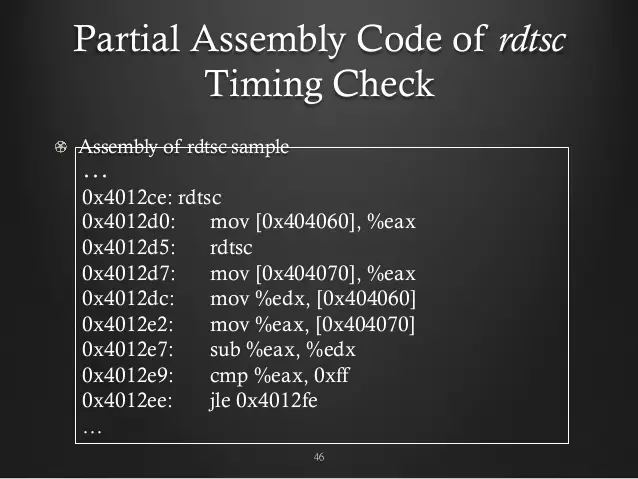
rdtsc-assembly-example
–EOF (The Ultimate Computing & Technology Blog) —
Last Post: The Geo Contextual Widget of Amazon Associates
Next Post: The Simple Mortgage Calculator Implemented in C/C++, Javascript and MySQL