The Magik programming language as described in here is a powerful dynamic-typed object-oriented programming language. Currently, it has been used widely at GE Smallworld GIS products. It has been ported to Java VM (Virtual Machine) at 2012.
The FizzBuzz is a good exercise to get familiar with any programming languages, and here we go:
# Write a short program that prints each number from 1 to 100 on a new line.
# For each multiple of 3, print “Fizz” instead of the number.
# For each multiple of 5, print “Buzz” instead of the number.
# For numbers which are multiples of both 3 and 5, print “FizzBuzz” instead of the number.
# I love Magik!
_package sw;
$

_block
    _for i _over range(1, 100)
    _loop
        _local div3? << i _mod 3 = 0
        _local div5? << i _mod 5 = 0
        _if div3? _andif div5? _then
            write("FizzBuzz")
        _elif div3? _then
            write("Fizz")
        _elif div5? _then
            write("Buzz")
        _else
            write(i)
        _endif
    _endloop
_endblock
Start a Magik session, then Compile in Visual Studio Code using Ctrl+F7 shortcut (the Magik-VS-code extension) and you should see the results printing out to the console correctly.
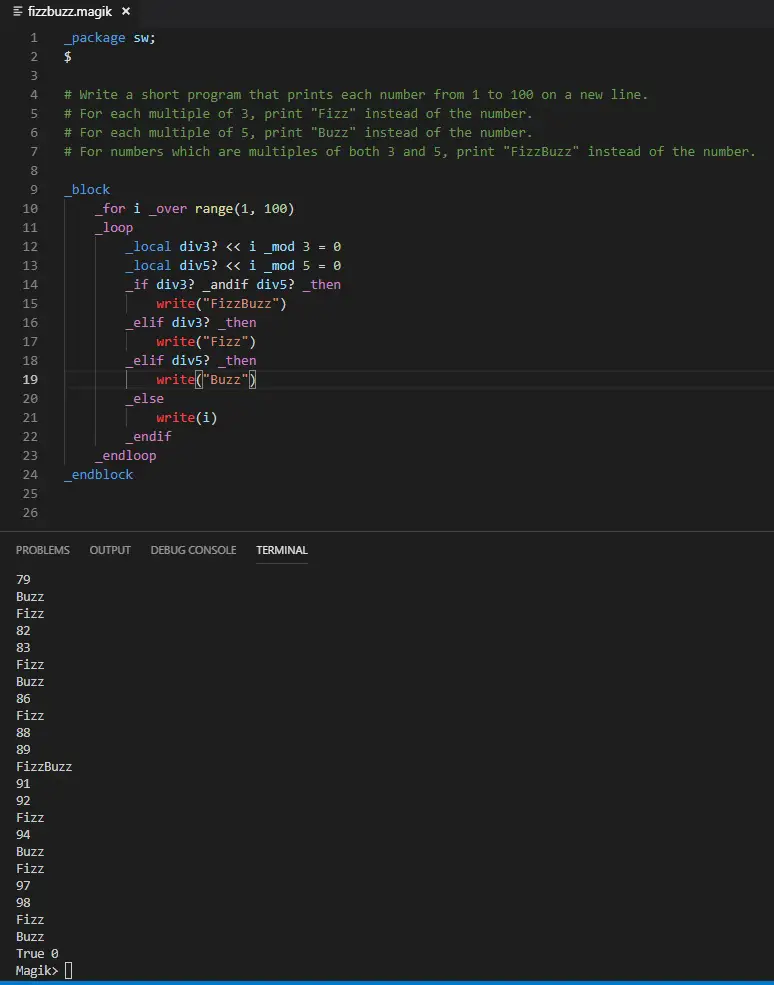
fizzbuzz-magik-exercise
FizzBuzz:
- Sexy One-liner of Python to Solve the FizzBuzz
- How to For-Loop and do Math/Arithmetic Operations in Windows/NT Batch – the FizzBuzz Programming Example
- The FizzBuzz Example in Magik Programming Language
- GoLang: FizzBuzz
–EOF (The Ultimate Computing & Technology Blog) —
402 wordsLast Post: How to Fix "Unsafe cannot be resolved to a type" in Eclipse/Java?
Next Post: Determine a Univalue Binary Tree via Recursive Depth First Search Algorithms
Hi,
Can you detail which vscode extension are you talking about?
The Smallworld Magik extension (Siamak Zolghadri) does not have the Ctrl+F7 shortcut to compile the code into the vscode terminal.
Hi thanks for the comment, currently this extension is under development and not public. – only in GE.