You can use Start-Process in Powershell to run an external program. And you can use runas to specify running as administrator. One example to run notepad as administrator in Powershell is:
Start-Process notepad -Verb runas
The detailed syntax for Start-Process
PS C:\Windows\System32\WindowsPowerShell\v1.0> help Start-Process

NAME
    Start-Process

SYNTAX
    Start-Process [-FilePath] <string> [[-ArgumentList] <string[]>] [-Credential <pscredential>] [-WorkingDirectory <string>] [-LoadUserProfile] [-NoNewWindow]
    [-PassThru] [-RedirectStandardError <string>] [-RedirectStandardInput <string>] [-RedirectStandardOutput <string>] [-Wait] [-WindowStyle <ProcessWindowStyle> {Normal
    | Hidden | Minimized | Maximized}] [-UseNewEnvironment]  [<CommonParameters>]

    Start-Process [-FilePath] <string> [[-ArgumentList] <string[]>] [-WorkingDirectory <string>] [-PassThru] [-Verb <string>] [-Wait] [-WindowStyle <ProcessWindowStyle>
    {Normal | Hidden | Minimized | Maximized}]  [<CommonParameters>]
The saps or start are two aliases. Start-Process is a general-purpose PowerShell command that supports a rich set of parameters. For example, you could start notepad and maximize the window at the start-up.
Start-Process notepad -WindowStyle Maximized
powershell
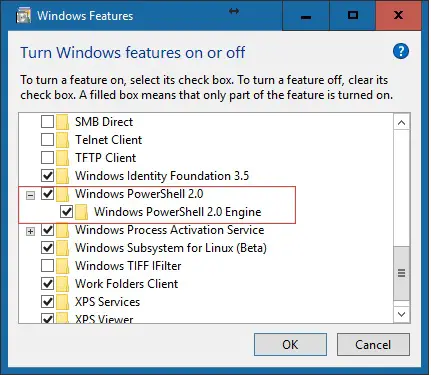
Compared to VBScript, Powershell is much powerful, however, Powershell is not installed by default on the modern Windows version, so you have to manually install it at [Programs and Features – Turn Windows Features On and Off]
turn-windows-features-on-and-off-powershell
–EOF (The Ultimate Computing & Technology Blog) —
Last Post: Batch Variable SubString Example - Extract Windows Version
Next Post: Run as Administrator in VBScript/JScript (WSH)