This post will produce a nice image showing fibonacci flowers like the following:
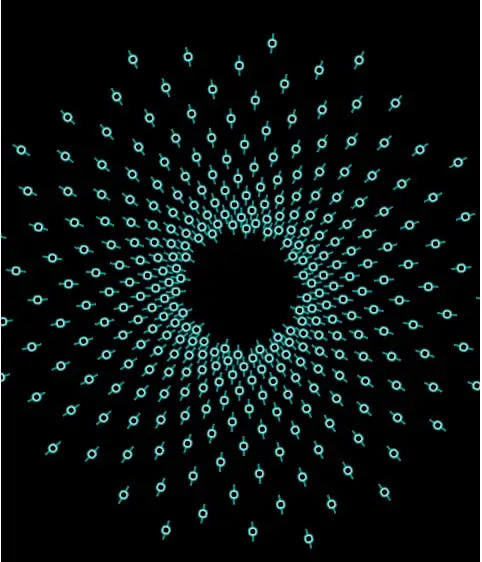
processing-fibonacci-flowers
Preparation
some variables are defined.
float ToRadians = PI / 180.0;
float gAngle = 137.5077640844293;
float rotation = 0.0;
float initialRotation = 0.0;
int width, height;

int totalPetals = 300;
Petal[] petals = new Petal[totalPetals];
float radiusGrowth = 1.0049;
float radius = 60;
Set up the Scene
Petal objects are created.
void setup() {
    width = 480;
    height = 600;
    size(width, height);
    noStroke();
    smooth();
    background(0);
    for (int i = 0; i < totalPetals; i++) {
        rotation += gAngle;
        radius *= radiusGrowth;
        Petal petal = new Petal();
        petal.x = width / 2 + cos(rotation * ToRadians) * radius;
        petal.y = height / 2 + sin(rotation * ToRadians) * radius;
        petal.rotation = rotation * ToRadians;
        petal.scale += (i * 2) / totalPetals;
        petal.render();
        petals[i] = petal;
    }
};
Petal class
class Petal {
  float x = 0.0;
  float y = 0.0;
  float rotation = 0.0;
  float scaleVar = 1;

  color baseColor = color(0, 255, 255, 150);
  color detailColor = color(255, 255, 255, 160);
  color trimColor = color(0, 0, 0);

  void render (){
      pushMatrix();
      translate(this.x, this.y);
      fill(this.baseColor);
      rotate(this.rotation);
      scale(this.scaleVar, this.scaleVar);
      rect(-10, -1, 20, 2);
      ellipse(0, 0, 10, 10);
      fill(this.detailColor);
      ellipse(0, 0, 8, 8);
      fill(this.trimColor);
      ellipse(0, 0, 5, 5);
      popMatrix();
  }
}
Demo
Thanks to Processing.JS, you can view the above code in the browser: https://helloacm.com/processing/fibonacci-flowers/
–EOF (The Ultimate Computing & Technology Blog) —
Last Post: Case Study - Use ImageRecycle to Save Over 2GB Storage on VPS
Next Post: VPS Free Upgrade to 6 Cores - QuickhostUK