MySQL server stopped due of out of memory exception on Ubuntu VPS
As you may know, my three websites are hosted on a VPS starter package from QuickHostUK – Unlimited Web Hosting. It costs 7 pounds per month, and what I get is pretty much enough for small websites.
The VPS starter provides 1 core, 512MB RAM and 10GB HDD. The CPU is not that bad.
cat /proc/cpuinfo  | head
processor       : 0
vendor_id       : GenuineIntel
cpu family      : 6
model           : 23
model name      : Intel(R) Xeon(R) CPU           E5440  @ 2.83GHz
stepping        : 6
microcode       : 0x1
cpu MHz         : 2826.278
cache size      : 4096 KB
physical id     : 0
A few days ago, everything was fine, the server status was ok before I went to sleep, after I woke up, the MySQL database was down but apparently the Apache2 server was OK and therefore, when I typed in my URL, it gives a ‘cannot connect to MySQL server’ kinda error. The SSH login was fine. but apparently the MySQL background process was missing. I had to start it by:
sudo service mysql start
In order to figure out what happened and prevent same things in the future, I looked into the /var/log/mysql folder for log files. and below are the logged messages:
1 [Warning] Using unique option prefix myisam-recover instead of myisam-recover-options is deprecated and will be removed in a future release. Please use the full name instead.
  1 [Note] Plugin 'FEDERATED' is disabled.
  1 InnoDB: The InnoDB memory heap is disabled
  1 InnoDB: Mutexes and rw_locks use GCC atomic builtins
  1 InnoDB: Compressed tables use zlib 1.2.8
  1 InnoDB: Using Linux native AIO
  1 InnoDB: Initializing buffer pool, size = 128.0M
InnoDB: mmap(137363456 bytes) failed; errno 12
  1 InnoDB: Completed initialization of buffer pool
  1 InnoDB: Fatal error: cannot allocate memory for the buffer pool
  1 [ERROR] Plugin 'InnoDB' init function returned error.
  1 [ERROR] Plugin 'InnoDB' registration as a STORAGE ENGINE failed.
  1 [ERROR] Unknown/unsupported storage engine: InnoDB
  1 [ERROR] Aborting
  1 [Note] /usr/sbin/mysqld: Shutdown complete
  2 [Warning] Using unique option prefix myisam-recover instead of myisam-recover-options is deprecated and will be removed in a future release. Please use the full name instead.
  2 [Note] Plugin 'FEDERATED' is disabled.
  2 InnoDB: The InnoDB memory heap is disabled
  2 InnoDB: Mutexes and rw_locks use GCC atomic builtins
  2 InnoDB: Compressed tables use zlib 1.2.8
  2 InnoDB: Using Linux native AIO
  2 InnoDB: Initializing buffer pool, size = 128.0M
InnoDB: mmap(137363456 bytes) failed; errno 12
  2 InnoDB: Completed initialization of buffer pool
  2 InnoDB: Fatal error: cannot allocate memory for the buffer pool
  2 [ERROR] Plugin 'InnoDB' init function returned error.
  2 [ERROR] Plugin 'InnoDB' registration as a STORAGE ENGINE failed.
  2 [ERROR] Unknown/unsupported storage engine: InnoDB
  2 [ERROR] Aborting
  2 [Note] /usr/sbin/mysqld: Shutdown complete
So, it seems that the 512MB memory is not enough and the MySQL aborted because of this.
How to Fix MySQL Crashes Due to OOM?
As it can be seen in the log files, the the InnoDB buffer pool size is set to 128MB. Therefore, one obvious solution is to change this to e.g. 64MB in the my.cnf.
# locate my.cnf
/etc/mysql/my.cnf
The second solution is to upgrade the VPS, which I did. I later upgraded the VPS to business package, which offers 1G RAM, 2 cores and 20GB HDD (twice).
# free -m
             total       used       free     shared    buffers     cached
Mem:           993        827        166         64        105        485
-/+ buffers/cache:        237        756
Swap:          255          0        255
root@uploadbeta:~# cat /proc/meminfo | head
MemTotal:        1017832 kB
MemFree:          156428 kB
Buffers:          107540 kB
Cached:           497004 kB
SwapCached:            0 kB
Active:           491892 kB
Inactive:         303588 kB
Active(anon):     212108 kB
Inactive(anon):    44740 kB
Active(file):     279784 kB
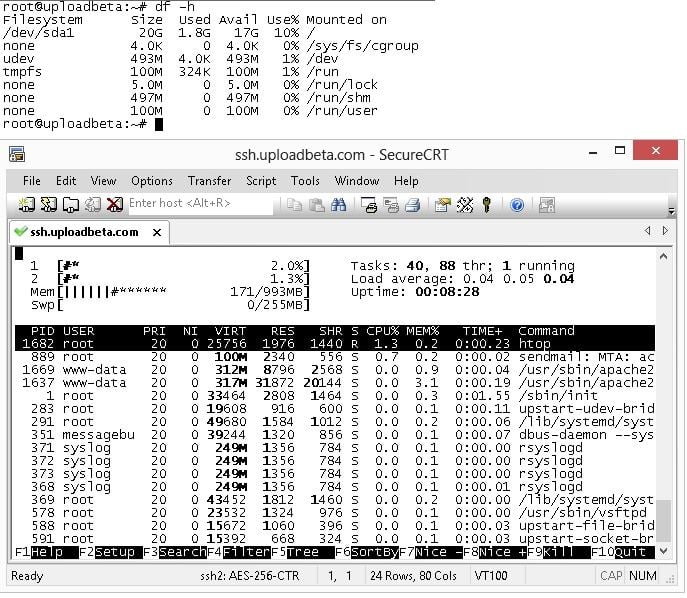

The other solution is to enable the swap. The swap are HDD file systems that are used to copy less-frequently used data onto so that more memory than physical RAM can be used. To see if there are currently used swap files, use the command sudo swapon -s, an empty file list suggests that currently the swap is disabled.
Filename Type Size Used Priority
Now, you can use df -h command to see the disk system usages.
# df -h
Filesystem      Size  Used Avail Use% Mounted on
/dev/sda1        20G  1.9G   17G  10% /
none            4.0K     0  4.0K   0% /sys/fs/cgroup
udev            493M  4.0K  493M   1% /dev
tmpfs           100M  324K  100M   1% /run
none            5.0M     0  5.0M   0% /run/lock
none            497M     0  497M   0% /run/shm
none            100M     0  100M   0% /run/user
So, we can decide how much space is for the swap system. Suppose, we want to allocate 256MB for swapfile.
sudo dd if=/dev/zero of=/swapfile bs=1024 count=256k
Now, the of specifies the output file path, which is /swapfile and you can change this path if you don’t like it. The next thing is to make it a proper swap file, by using command:
sudo mkswap /swapfile
It will show up something like this:
Setting up swapspace version 1, size = 262140 KiB
no label, UUID=104c4535-5ac5-43f3-aab3-cfbd653fe8ab
Now, we can finish this by enabling it.
sudo swapon /swapfile
Let us see if it is on:
# swapon -s
Filename                                Type            Size    Used    Priority
/swapfile                               file            262140  0       -1
This is on until the VPS restarts, so to enable it everytime, you should set this up in the fstab
sudo vim /etc/fstab
And add the following line:
/swapfile none swap sw 0 0
Finally, we set the swapness to 10 to prevent out-of-memory crashes.
echo 10 | sudo tee /proc/sys/vm/swappiness
echo vm.swappiness = 10 | sudo tee -a /etc/sysctl.conf
For security purposes, you should also set the right file permission otherwise, it may be world-wide writeable.
sudo chown root:root /swapfile
sudo chmod 0600 /swapfile
With the above three solutions, the VPS Apache2 + MySQL can simultaneously serve more visitors. Hooray!
DevOps / Site Reliability Engineering
- How to Clean Up NVM Node Versions Except One?
- Monitoring 28 VPS Machines including a Raspberry Pi with Nezha Dashboard
- Python/Bash Script to Print the Optimized Parameters for MySQL Servers
- Learn to Manage Your MySQL Database with a Python Script
- A Simple PHP Command Line Tool to Convert MySQL Tables from MyISAM to InnoDB in Specified Database
- How to Print MySQL Table Summary using PHP?
- Secure the Linux Server by Disallow the Remote Root Login (SSH and FTP and MySQL database)
- Bash Script to Check, Repair, Optimise and Backup MySQL database
- Duplicate a MySQL table - Copy Table / Duplicate Database / PHP Script
- MySQL server stopped due of out of memory exception on Ubuntu VPS
- Running Apache Server (PHP + MySQL) on Raspberry PI
- How to Optimise SQL Queries? Quick Tips
- Recovery Models in SQL Server
- Database Optimisation Script in PHP
–EOF (The Ultimate Computing & Technology Blog) —
Last Post: The Childhood Memory - Subor Famicom Clone SB-486D (Xiao Ba Wang)
Next Post: Duplicate a MySQL table - Copy Table / Duplicate Database / PHP Script