
LAA (Large Address Aware) is the technique of setting a flag (hex: 0x20) in the Win32PE header that tells the Operating System that the executable may need a larger memory. In Win32, the maximum memory that a pointer can represent is 0 to 0xFFFFFFFF, which is 

It is not recommended to do so if the physical memory is less than 3GB because this might slow down the applications if LAA is enabled. For 32-bit OS, if /PAE (Physical Address Extension) or /3GB switch is enabled, LAA can be also set as well.
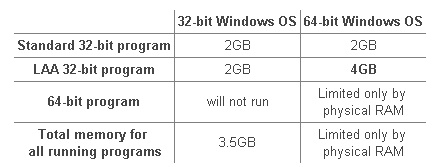
The following table shows the memory limitation by LAA and OS. The /3GB or /PAE is not on, the LAA has not effects on 32-bit programs on 32-bit OS.

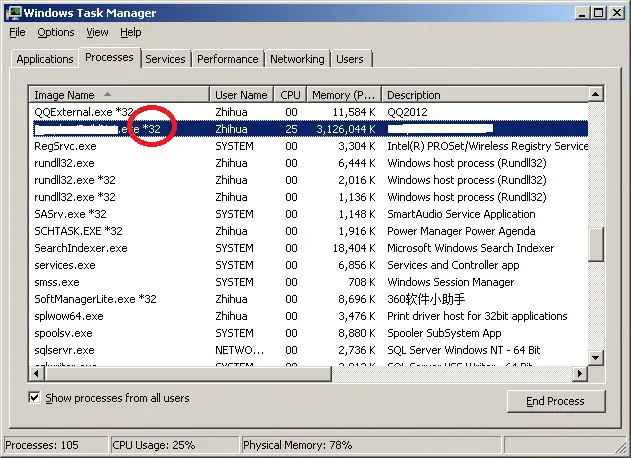
The following shows that a 32-bit program runs under Win7 64- 8GB and sucessfully manages to use around 3GB RAM.

If you write Delphi programs, you can easy enable LAA by telling the compiler to set the flag 0x20 in the exe image header. The compiler option is
{$SetPEFlags $20}
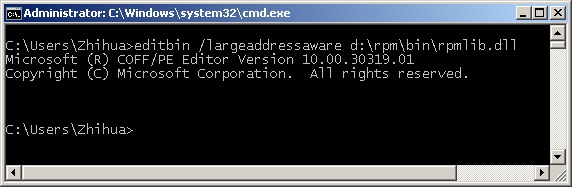
However, for C# .NET applications, you can also enable LAA by running the following command.
editbin /largeaddressaware some.exe

For Native C++ code, you can actually set the linker to automatically flag this bit for you.

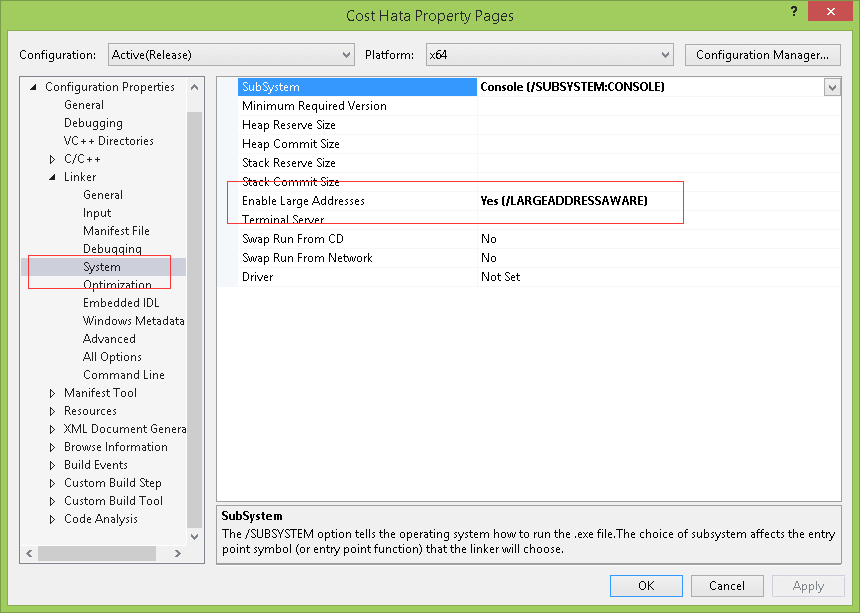
visual-studio-laa-linker
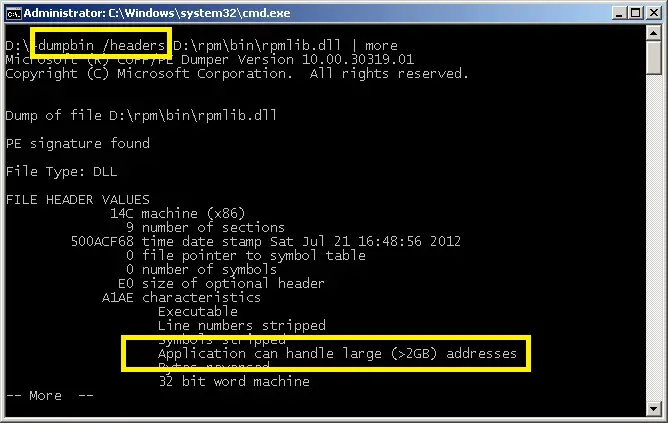
You can also use command dumpbin /headers to check if LAA is enabled for some executables or library. If the exectuable is LAA enabled, it will show the message “Application can handle large (> 2GB) addresses”

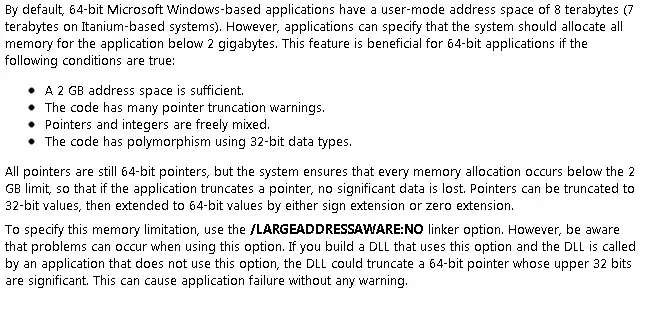
The following is from MSDN, which explains the LAA.

The most biggest advantage of 64-bit window is the 64-bit space instead of a larger set of 64-bit registers. If the /3GB switch is on, the 32-bit programs can still be limited to 2GB space if the LAA is not enabled. The LAA flag is the same thing on 32-bit and 64-bit windows. If the flag is set, it can afford to give the entire 4GB address space for 32-bit programs to use. Some 32-bit applications benefit from running on 64-bit windows even though they are not using any 64-bit features. These programs are usually tight on address space i.e. require large memory to do caching etc.
In [stackoverflow], the following C# code describes how to check if any given executable is LAA by reading the file as a stream and check the image header. The flag to look for is 0x20.
static bool IsLargeAware(string file)
{
    using (var fs = File.OpenRead(file))
    {
        return IsLargeAware(fs);
    }
}

// Checks if the stream is a MZ header and if it is large address aware
static bool IsLargeAware(Stream stream)
{
    const int IMAGE_FILE_LARGE_ADDRESS_AWARE = 0x20;

    var br = new BinaryReader(stream);

    if (br.ReadInt16() != 0x5A4D)       //No MZ Header
        return false;

    br.BaseStream.Position = 0x3C;
    var peloc = br.ReadInt32();         //Get the PE header location.

    br.BaseStream.Position = peloc;
    if (br.ReadInt32() != 0x4550)       //No PE header
        return false;

    br.BaseStream.Position += 0x12;
    return (br.ReadInt16() & IMAGE_FILE_LARGE_ADDRESS_AWARE) == IMAGE_FILE_LARGE_ADDRESS_AWARE;
}
–EOF (The Ultimate Computing & Technology Blog) —
Last Post: Bash SHELL, Chess Board Printing
Next Post: Interview Question: Simple Division