The Fibonacci Number is very well known, probably due to its recursive definition. [read this]
In Excel, you can easily list the Fib series in the cells using drag and auto-complete technique.
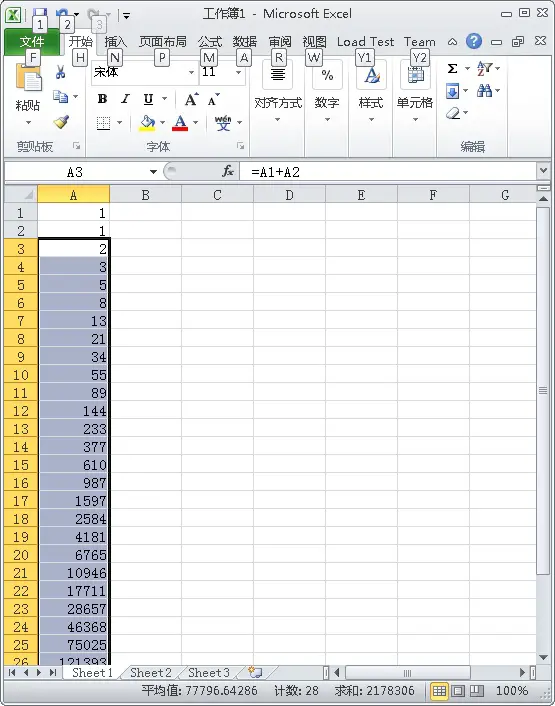
All you have to do is enter first two values of the Fib numbers i.e. 1, 1 in one colume e.g. A1, A2. The next thing is enter the formula =A1+A2 in the next row e.g. A3. The A3 value will be computed immediately which shows 2.
The next step is drag the A3 down to as many as you want… The formulations for new cells will automatically be filled by Excel with adjustments. e.g. =A2+A3, =A3+A4 …and so on.
Isn’t this easy? 🙂
Excel Tutorial
- Microsoft's Excel Just Got Smarter: The New Copilot Function
- Excel Tutorial: SUMIF Function
- Iterative Computing Fib Number using Excel
- How to Transform the Values in Excel Files to a Column of Values
- Excel Sheet to Calculate the Miles Per Gallon Average Gas Cost
- How to Calculate Mortgage Monthly Payment using Excel with Formula
- Four Useful Cell Functions/Values in Excel
- Excel Tip: Faster Auto-Complete
–EOF (The Ultimate Computing & Technology Blog) —
188 wordsLast Post: A Recursive Full Permutation Algorithm in Python
Next Post: How to Display Your Email Address As Image?