Since Delphi 10.2 Tokyo supports the same codebase compiled into Win32, Win64 and Linux64 binaries, then it is interesting to run a small tests for a quick performance overview targeted different platforms.
Delphi Code to Test the Prime
We have seen the code to test if a given integer is a prime:
// https://helloacm.com/integer-performance-comparisons-of-delphi-win32-win64-and-linux64-for-singlemultithreading-counting-prime-number/
function IsPrime(x: Integer): Integer;
var
  i, q: integer;
begin
  if (x <= 1) then
  begin
    Exit(0);
  end;
  q := Floor(Sqrt(x));
  for i := 2 to q do
  begin
    if (x mod i = 0) then
    begin
      Exit(0);
    end;
  end;
  Exit(1);
end;
Note, there are faster prime testing algorithms but here we want to compare the overall integer performance between different type of binaries (same codebase), so algorithm part is not our focus this time.
How to Time Your Code in Delphi?
We can use the Win32 API GetTickCount but that is in Windows Unit so not portable to Linux platform. Instead, we can use the TThread.GetTickCount which is a static method that returns the number of ticks since the OS starts.
So the timing part is like this:
starttime := TThread.GetTickCount;
// some heavy computation
Writeln(TThread.GetTickCount - starttime);
How Count the Number of Primes between 1 to N in Delphi?
We will test 2 versions (single threaded and multithreading) on 3 target platforms, Win32, Win64 and Linux64.
The Single-Threaded Delphi Version
The Single threaded version that counts the number of prime numbers from 1 to N is easy and straightforward:
s := 0;
for i := 1 to MAXN do
begin
  Inc(s, IsPrime(i));
end;
Writeln(s);
The Parallel Version
The parallel version could be different. Our approach here is to recursively divide the number ranges into two halves. Use the ITask to compute each half concurrently. If the range is smaller than e.g. 500 numbers, then we conduct a serial for-loop, which is generally considered far more efficient.
// https://helloacm.com/integer-performance-comparisons-of-delphi-win32-win64-and-linux64-for-singlemultithreading-counting-prime-number/
function Test(left, right: Integer): Integer;
var
  i, mid, lefts, rights: Integer;
  job_left, job_right: ITask;
begin
  if (right - left <= 500) then
  begin // count the answer in this small range
    Result := 0;
    for i := left to right do
    begin
      Inc(Result, IsPrime(i));
    end;
  end
  else // recursively divide into two halves.
  begin
    mid := left + (right - left) div 2; // avoid integer overflow
    lefts := 0;
    rights := 0;
    job_left := TTask.Create( // left range
      procedure()
      begin
        lefts := Test(left, mid); // get the answer of left range.
      end
    );
    job_right := TTask.Create( // right range
      procedure()
      begin
        rights := Test(mid + 1, right); // get the answer for right range.
      end
    );
    job_left.Start; // start this job
    job_right.Start;  // start this job
    TTask.WaitForAll([job_left, job_right]); // wait for both
    Result := lefts + rights; // sum both parts
  end;
end;
Performance Results
Timings (number of ticks, the smaller, the faster) for the above Delphi code (same code, but compiled into RELEASE versions of 3 different target platforms: Win32, Win64 and Linux64):
- Win32 Single Threading: 4797 v.s. Win32 Parallel Version: 1437
- Win64 Single Threading: 4296 v.s. Win64 Parallel Version: 1578
- Win32 Single Threading: 10252 v.s. Win32 Parallel Version: 2226
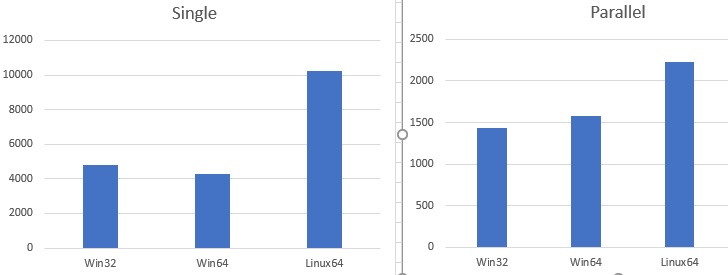
single-threaded v.s. multithreading performance comparison-table (delphi counting primes)
For Parallel Versions (that uses Delphi Task Parallel Library), the Win32 runs slightly faster than 64bit version. For Single-threaded version, the Win64 runs slightly than the 32-bit version.
We use the Linux SubSystem in Windows 10, which runs a bit slower, but this may not be the case in the truly native 64-bit Linux server. However, the performance comparisons presented here are in general fair, because they run on exactly the same PC, which is: ThinkCenter M900 (Intel i7-6700 Quad Cores up to 4GHz), 32GB DDR4 2133MHz, and the OS is Win10 64bit.
It is also interesting to know that the native Linux code compiled on Windows and runs directly on Windows 10 (Under Linux sub system) can be seen in the Task Manager, and you can kill it as well. Yes, Linux Native Application Shows up on Windows Task Manager.
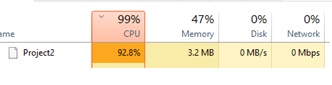
Linux-Application-Shows-Up-on-Windows-Task-Manager
Related Delphi for Linux 64-bit Posts
- Delphi Compiles code to Linux 64-bit
- Quick Review: Delphi 10.2 Tokyo Preview
- Integer Performance Comparisons of Delphi Win32, Win64 and Linux64 for Single/Multithreading Counting Prime Number
- Integer Performance Comparison for C++, C#, Delphi
Delphi / Object Pascal
- Delphi is 30 Years Old!
- Reviews of FixInsight - Delphi Static Code Analyser
- Lighting-fast Delphi 2007 Compiling Speed
- The Inline Keyword in Delphi
- Does Parallel.For in Delphi Actually Improve the Performance?
- Delphi TParallel Cleanup Needed
- Delphi Compiles Code to Linux 64-bit Server
- Integer Performance Comparisons of Delphi Win32, Win64 and Linux64 for Single/Multithreading Counting Prime Number
- How to Check If Running in 64-bit Windows Environment using Delphi?
- How to Check Debugger Present in Delphi?
- Delphi Static Code Analyser - FixInsight
- Optimal SizeOf Code Generated in Delphi 2007
–EOF (The Ultimate Computing & Technology Blog) —
Last Post: Quick Review: Delphi 10.2 Tokyo Preview
Next Post: What is DDOS and How do you Cope with DDOS Attacks?