I recently consider purchasing my third VPS Server and the ping speed is one of the concern. I have a relatively high ping (around 250 ms) from UK to the server located in Singapore, which makes typing commands in SSH console a little bit unpleasant.
Luckily, some VPS providers e.g. Vultr, provides IP addresses for its 15 locations, so you can test ping speed. How to do this automatically without typing ping command everytime?
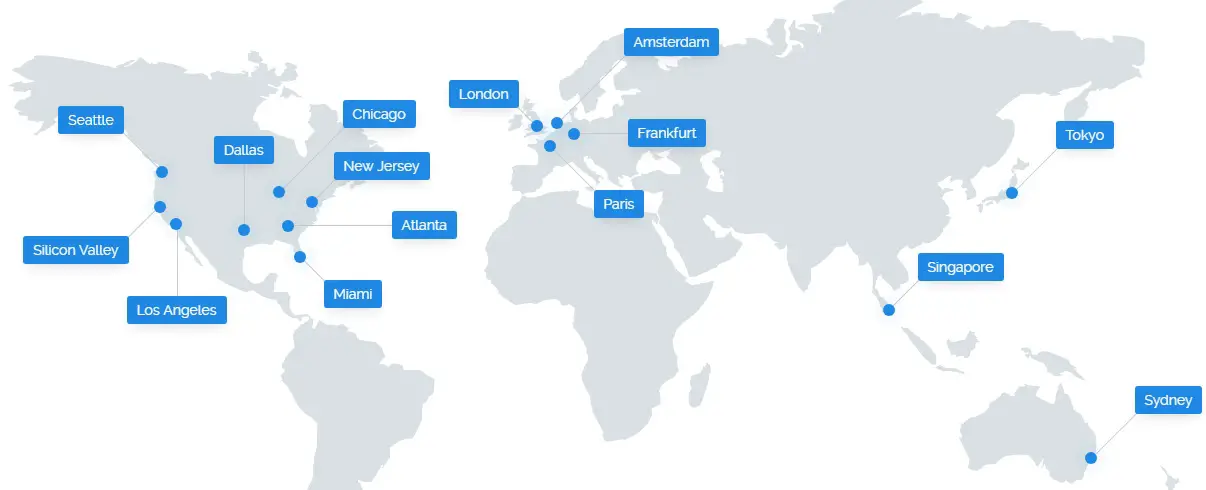
vultr server locations globally
You could find a sample PHP Script to do this:
<?php
// https://helloacm.com/how-to-make-ping-tests-to-global-servers-using-php/

// server name and their IP
$server = array(
  "Frankfurt DE" => "108.61.210.117",
  "Amsterdam, NL" => "108.61.198.102",
  "Paris, France" => "108.61.209.127",
  "London, UK" => "108.61.196.101",
  "Tokyo, Japan" => "108.61.201.151",
  "Singapore" => "45.32.100.168",
  "New York (NJ)" => "108.61.149.182",
  "Chicago, Illinois" => "107.191.51.12",
  "Seattle, Washington" => "108.61.194.105",
  "Atlanta, Georgia" => "108.61.193.166",
  "Silicon Valley, California" => "104.156.230.107",
  "Dallas, Texas" => "108.61.224.175",
  "Miami, Florida" => "104.156.244.232",
  "Los Angeles, California" => "108.61.219.200",
  "Sydney, Australia" => "108.61.212.117"
);

// store sorted results
$result = array();

foreach ($server as $name => $ip) {
  // exec runs the command and capture the last line of output
  $output = exec("ping -c 3 $ip");
  if (preg_match("/rtt min\/avg\/max\/mdev = ([0-9]+\.[0-9]+)\/([0-9]+\.[0-9]+)\/([0-9]+\.[0-9]+)(.*)/", $output, $match)) {
    // calculate the ping as the average of three ms in last line
    $ping = ((float)$match[1] + (float)$match[2] + (float)$match[3]) / 3;
    $result[$name] = $ping;
  }
}

// sorted from the smallest ping to highest
asort($result);

foreach ($result as $name => $ping) {
  echo "$name - $ping ms\n";
}
The essence of this handy PHP Script is to use the exec function, which runs the external command ping and returns the last line of its output.
root@happyukgo:/var/www/vultr$ ping -c 3 127.0.0.1
PING 127.0.0.1 (127.0.0.1) 56(84) bytes of data.
64 bytes from 127.0.0.1: icmp_seq=1 ttl=64 time=0.039 ms
64 bytes from 127.0.0.1: icmp_seq=2 ttl=64 time=0.041 ms
64 bytes from 127.0.0.1: icmp_seq=3 ttl=64 time=0.038 ms

--- 127.0.0.1 ping statistics ---
3 packets transmitted, 3 received, 0% packet loss, time 1998ms
rtt min/avg/max/mdev = 0.038/0.039/0.041/0.005 ms
Then based on the output string, we use the regex tester preg_match and average these 3 pings. Finally, we sort the array by values. Below, the speed tests from UK, USA and Singapore to global locations are carried out and it is suprising that the ping between USA (East) and UK is less than 80ms.
Ping Speeds From Rugby, UK
- London, UK – 6.27 ms
- Amsterdam, NL – 13.36 ms
- Paris, France – 13.39 ms
- Frankfurt DE – 19.89 ms
- New York (NJ) – 78.7 ms
- Chicago, Illinois – 92.17 ms
- Miami, Florida – 107.27 ms
- Dallas, Texas – 117.40 ms
- Seattle, Washington – 135.78 ms
- Atlanta, Georgia – 139.66 ms
- Silicon Valley, California – 156.32 ms
- Los Angeles, California – 169.51 ms
- Singapore – 191.94 ms
- Tokyo, Japan – 229.30 ms
- Sydney, Australia – 291.34 ms
Ping Speeds from New York, East of USA
- New York (NJ) – 0.36 ms
- Atlanta, Georgia – 19.04 ms
- Chicago, Illinois – 20.94 ms
- Miami, Florida – 32.36 ms
- Dallas, Texas – 42.35 ms
- Seattle, Washington – 62.0433 ms
- London, UK – 67.52 ms
- Los Angeles, California – 70.68 ms
- Frankfurt DE – 78.54 ms
- Paris, France – 79.47 ms
- Silicon Valley, California – 79.841 ms
- Amsterdam, NL – 80.65 ms
- Tokyo, Japan – 162.70 ms
- Sydney, Australia – 217.58 ms
- Singapore – 231.35 ms
Ping Speeds from Singapore
- Singapore – 0.53 ms
- Tokyo, Japan – 77.10 ms
- Silicon Valley, California – 170.44 ms
- Los Angeles, California – 177.97 ms
- Frankfurt DE – 182.87 ms
- London, UK – 184.52 ms
- Seattle, Washington – 187.12 ms
- Sydney, Australia – 189.44 ms
- Dallas, Texas – 202.88 ms
- Chicago, Illinois – 218.10 ms
- New York (NJ) – 229.11 ms
- Atlanta, Georgia – 240.88 ms
- Miami, Florida – 245.59 ms
- Paris, France – 256.78 ms
- Amsterdam, NL – 326.08 ms
Ping Speeds from Fermont, West of USA
- Silicon Valley, California – 1.70 ms
- Los Angeles, California – 8.37 ms
- Seattle, Washington – 19.55 ms
- Dallas, Texas – 40.36 ms
- Chicago, Illinois – 54.36 ms
- Atlanta, Georgia – 63.63 ms
- New York (NJ) – 74.56 ms
- Miami, Florida – 88.70 ms
- Tokyo, Japan – 109.07 ms
- London, UK – 139.23 ms
- Amsterdam, NL – 144.52 ms
- Sydney, Australia – 157.04 ms
- Paris, France – 159.29 ms
- Frankfurt DE – 161.55 ms
- Singapore – 171.10 ms
Ping Speeds from Tokyo, Japan
- Tokyo, Japan – 1.018 ms
- Singapore – 77.32 ms
- Seattle, Washington – 84.54 ms
- Silicon Valley, California – 108.94 ms
- Los Angeles, California – 110.05 ms
- Sydney, Australia – 114.74 ms
- Chicago, Illinois – 146.85 ms
- Dallas, Texas – 155.129 ms
- Atlanta, Georgia – 163.17 ms
- New York (NJ) – 170.06 ms
- Miami, Florida – 174.35 ms
- London, UK – 229.86 ms
- Frankfurt DE – 253.58 ms
- Amsterdam, NL – 273.022 ms
- Paris, France – 287.42 ms
You could then add a small project by tracking these ping values day by day e.g. using crontab and store it in database…
You could assume the ping speed is similar (bi-directional) if you swap the source and target. Please also note that, for security purposes, please turn off your PING services once you are happy to know that connection speed.
This page will be updated on irregular basis with updated servers and ping speed.
Related Posts
–EOF (The Ultimate Computing & Technology Blog) —
1071 wordsLast Post: How to Async and Await in C++11?
Next Post: Delphi Compiles Code to Linux 64-bit Server