Posting regularly the posts to social networks help increase the site traffic effectively, e.g. Facebook, Twitter, Tumblr. It certainly is good if we can automate this process. With the use of IFTTT and crontab, this becomes easy.
IFTTT Maker Channel
The Maker channel in IFTTT can be triggered by ‘receiving a web request’, and it supports up to 3 parameters i.e. value1, value2 and value3 in the format of JSON. For example, you can invoke the SayHi event with two parameters {“value1″:”Hello”,”value2″:”Computing”}.
curl -X POST -H "Content-Type: application/json" -d '{"value1":"Hello","value2":"Computing"}' https://maker.ifttt.com/trigger/{SayHi}/with/key/REPLACE_KEY
Posting to Social Network via IFTTT
It is straightforward to create a new applet (IFTTT rule) with Maker and the social network of your choice e.g. Facebook. Also, you need to specify the name of the event for the Maker to work (which is the ‘this’ part of the IFTTT).
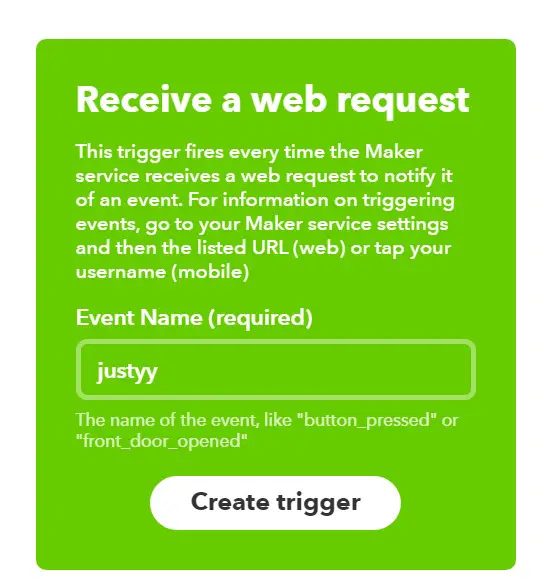
maker-receive-a-web-request
Then, you need to specify the action (which is the ‘that’ part of IFTTT).

maker-configuration of value1, value2, and value3 parameters
Automatic PHP Script
Now, we can write a PHP script to automate this: choose a post (e.g. random, or by ID) that is not posted in the last e.g. 90 days, put the link in the database, and invoke the Maker channel which triggers the rule to post to the social network of your-choice.
For WordPress, if we choose a random post, the PHP script will be something like this:
<?php
  // https://helloacm.com/how-to-prevent-script-running-from-browsers/
  require('deny-from-web.php'); // avoid calling from the web URL,
  require('db.php');
  $connection = mysqli_connect(DB_HOST, DB_USER, DB_PASSWORD, "blog_database");
  $today = date("Y-m-d h:i:s");
  $query = "select
        count(1)
      from
        `wp_posts`
      where
        (`post_type` = 'post') and
        (`post_status` = 'publish')
  ";
  $result = mysqli_query($connection, $query);
  $row = mysqli_fetch_row($result);
  $total = $row[0];
  $cnt = 0;
  if ($total > 0) {
    while (1) {
      $idx = mt_rand(0, $total - 1);
      $query = "
        select
          `post_name`, `ID`, `post_title`
        from
          `wp_posts`
        where
          (`post_type` = 'post') and
          (`post_status` = 'publish')
        limit $idx, 1
      ";
      $result = mysqli_query($connection, $query);
      $row = mysqli_fetch_array($result);
      $url = "https://helloacm.com/".$row['post_name'] . '/';
      $title = $row['post_title'];
      $query2 = "select date(`posttime`) from `twitter` where `url` = '$url' order by `posttime` desc limit 1";
      $result2 = mysqli_query($connection, $query2);
      if (mysqli_num_rows($result2) > 0) {
        $lastrow = mysqli_fetch_row($result2);
        $last = $lastrow[0];
        $diff = abs((strtotime($today) - strtotime($last)) / 24 / 3600);
        if ($diff <= 90) {
          $cnt ++;
          if ($cnt > 16) {// avoid endless loop
            break;
          }
          continue;
        }
      }
      $query = "
        insert into `twitter`
        set
          `url` = '$url',
          `posttime` = '$today'
      ";
      mysqli_query($connection, $query);
      $msg = $title;
      $value1 = $url;
      $value2 = $title;
      echo "value2 = " . $value2 . " \n";
      echo "value1 = " . $value1 . " \n";
      // invoke the IFTTT Maker Channel
      shell_exec("curl -s -X POST -H \"Content-Type: application/json\" -d '{\"value1\":\"$value1\",\"value2\":\"$value2\"}' https://maker.ifttt.com/trigger/{justyy}/with/key/YOUR_KEY");
      break;
    }
  }
  echo "Done!\n";
In order for the above to work, you need to create a table to store the posted articles (via MySQL):
--
-- Table structure for table `twitter`
--

CREATE TABLE `twitter` (
  `id` bigint(32) NOT NULL,
  `url` varchar(255) NOT NULL,
  `posttime` date NOT NULL
) ENGINE=MyISAM DEFAULT CHARSET=latin1;

--
-- Indexes for dumped tables
--

--
-- Indexes for table `twitter`
--
ALTER TABLE `twitter`
  ADD PRIMARY KEY (`id`),
  ADD KEY `urla` (`url`),
  ADD KEY `dd` (`posttime`);

--
-- AUTO_INCREMENT for dumped tables
--

--
-- AUTO_INCREMENT for table `twitter`
--
ALTER TABLE `twitter`
  MODIFY `id` bigint(32) NOT NULL AUTO_INCREMENT, AUTO_INCREMENT=11;
Crontab Configuration for Automatic Blog Posting
The final step after you have tested above script is to add the PHP command to crontab jobs. You can configure the frequency e.g. @daily or @weekly, @monthly etc.
@daily php /path-to-your-script/ifftt-post-blog.php
–EOF (The Ultimate Computing & Technology Blog) —
Last Post: Words Typed in One-Row's American Keyboard
Next Post: How to Monetize Chrome Extension by Injecting Ads in the Browser?