If you are a system administrator or a programmer on Windows Platform, you must use the Command Shell (cmd) a lot. And quite often, you must cd to a specified directory.
With the following tip, you can easily enter the command shell with the path already cd to that folder.
Save the following text using any text editor (e.g. notepad) as a file name that ends with *.reg.
Windows Registry Editor Version 5.00

[HKEY_CLASSES_ROOT\Folder\shell\runas]
@="ADMIN CMD"
"Icon"="C:\\Windows\\System32\\cmd.exe,0"

[HKEY_CLASSES_ROOT\Folder\shell\runas\command]
@="cmd.exe /k pushd %1"
And double click the *.reg file you just created, and click OK to confirm the settings to the Registry.
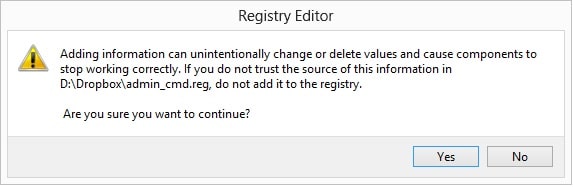
Click OK to enter information to registry
And, you are good to go. You can right click any folder name and there will be a new entry [admin cmd], click on that will open a new command prompt with the folder already changed cd to that folder.
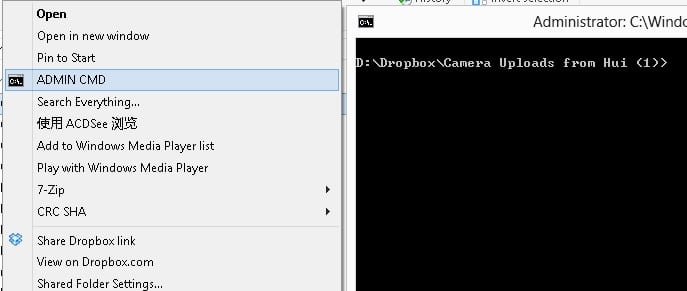
cmd opened and the folder has been changed.
Update: Actually, you can right click the folder and press SHIFT together, so this will give you option “Open Command Prompt From Here!”. This is a quick way without the hassle of Registry solution.
–EOF (The Ultimate Computing & Technology Blog) —
331 wordsLast Post: C++ Function Pointers to Member Methods in Class
Next Post: Easy Round Robin Scheduled Database Backup on Linux