On 8-bit Famicom clones (Famiclones), the memory is usually in ‘real-mode’ meaning that you can access directly the memory by specifying the memory addresses. On most BASIC implementations of famicoms or clones or educational computers (most are 8-bit), there are two important and powerful functions, peek and poke which are used to read from and write to memory locations.
The BBG, as described here, is in my opinion the most powerful 8-bit famiclones with keyboards and floppy drive. It boots from floppy drive (the floppy disk secton 0 contains the bootable system file) and the clone OS, BBGDOS resembles MS-DOS 3.2 with the same file system (FAT12) and same commands such as dir, copy, cd and so many others.
Dumping the memory is useful, and often is the first step to collect the important data (such as ROM) to write a emulator. The following BASIC program will ask for the memory locations from and to, in order to collect the values and put them in the disk.
10   REM DUMP BIOS ON BBG
11   REM BY HELLOACM.COM
12    PRINT "DUMP MEMORY - HELLOACM.COM"
13    PRINT "MADE BY DR justyy"
14    PRINT "ENTER MIN MEMORY LOCATION"
20    INPUT MINMEM
21    IF MINMEM<0 THEN  PRINT "MINMEM<0": GOTO 14
25    PRINT "ENTER MAX MEMORY LOCATION"
30    INPUT MAXMEM
31    IF MAXMEM<MINMEM THEN  PRINT "MIN MEM SHOULD BE SMALLER THAN MAX MEM": GOTO 30
40    PRINT "DUMPING MEM, PLEASE WAIT..."
42    PRINT "MEM FROM ";MINMEM;" TO ";MAXMEM
43    OPEN "O",#1,"DUMP.DAT"
45    FOR I=MINMEM TO MAXMEM
50    VAR$=CHR$(PEEK(I))
55    PRINT VAR$;
56    PUTC #1,VAR$
60    NEXT
70    CLOSE #1
75    PRINT ""
80    PRINT "MEM SAVED TO 'DUMP.DAT' OK! BYE BYE!"
The most important statement is VAR$=CHR$(PEEK(I)) which gets the value (1 byte each time) from the memory. The values are dumped into file dump.dat (feel free to modify).
Here is how it looks like when you hit the RUN:
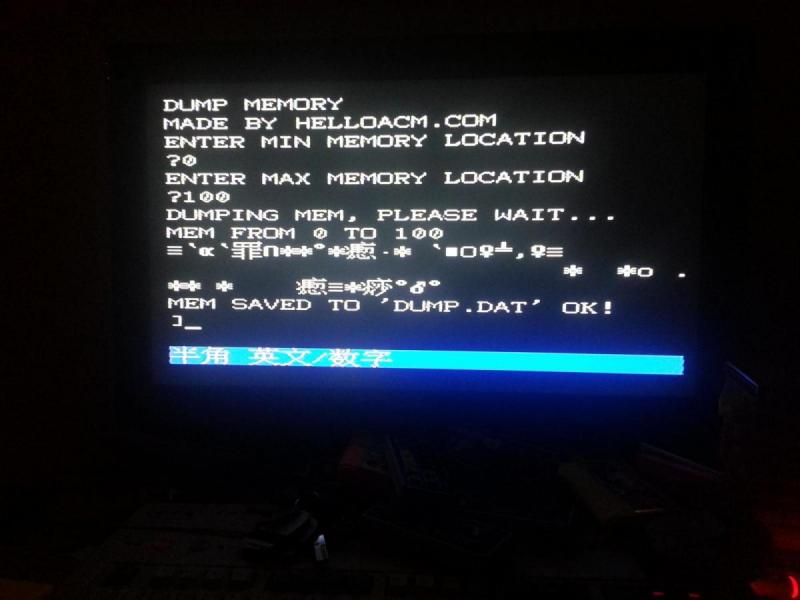

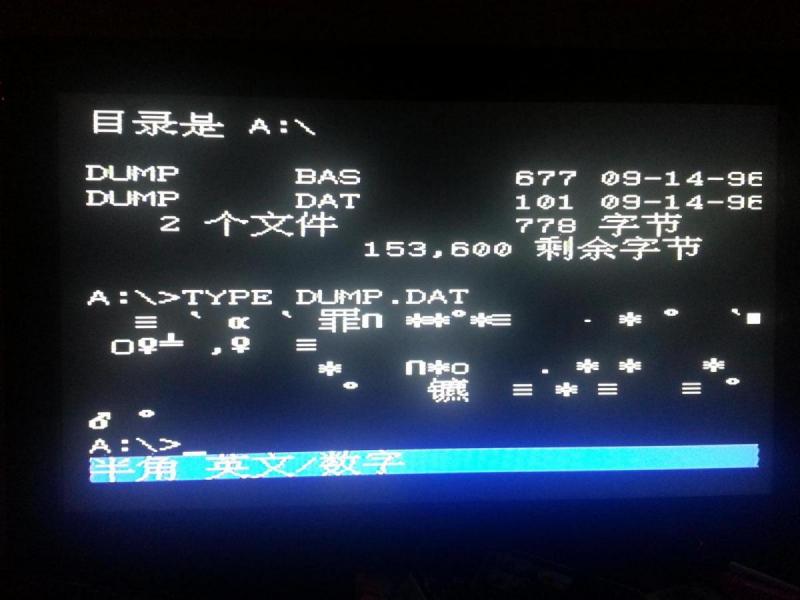
And the values are printed to the screen at the same time, and the file is indeed saved to disk.
–EOF (The Ultimate Computing & Technology Blog) —
Last Post: Automatically Synchronize Date and Time on 8-bit BBG Famiclone using DB25 cable to Connect to PC
Next Post: Adding a pause command for 8-bit famiclone BBG - 6502 Assembly Programming