The halloween is approaching. Mathworks presents the following Matlab code to draw a Pumpkin.

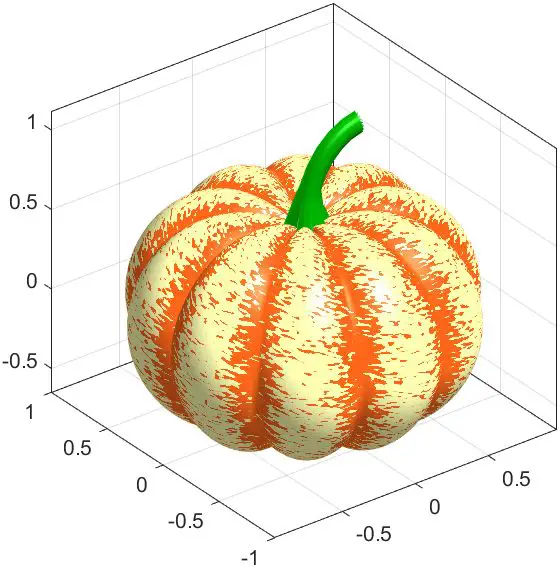
Pumpkin in Matlab
% Pumpkin
[X,Y,Z]=sphere(200);
R=1-(1-mod(0:.1:20,2)).^2/12;
x=R.*X; y=R.*Y; z=Z.*R;
c=hypot(hypot(x,y),z)+randn(201)*.03;
surf(x,y,(.8+(0-(1:-.01:-1)'.^4)*.3).*z,c, 'FaceColor', 'interp', 'EdgeColor', 'none')
% Stem
s = [ 1.5 1 repelem(.7, 6) ] .* [ repmat([.1 .06],1,10) .1 ]';
[t, p] = meshgrid(0:pi/15:pi/2,0:pi/20:pi);
Xs = -(.4-cos(p).*s).*cos(t)+.4;
Zs = (.5-cos(p).*s).*sin(t) + .55;
Ys = -sin(p).*s;
surface(Xs,Ys,Zs,[],'FaceColor', '#008000','EdgeColor','none');
% Style
colormap([1 .4 .1; 1 1 .7])
axis equal
box on
material([.6 1 .3])
lighting g
camlight
Mathworks Matlab
- Draw a Pumpkin using Matlab
- How to Import/Export Matlab *.mat file to Python?
- How to Plot 3D Line Vectors in Matlab Using quiver3?
- The bitand in Matlab
–EOF (The Ultimate Computing & Technology Blog) —
Last Post: Enabling the Debug Console for WSL2 (Windows Subsystem for Linux)
Next Post: Use DirectX Diagnostic Tool (dxdiag) to View System Information