Parallel.For is a feature introduced in Delphi’s Parallel Programming Library (PPL) that allows developers to execute loops concurrently across multiple CPU cores, significantly improving performance for computationally intensive tasks. Unlike a traditional for loop, which executes sequentially, Parallel.For divides the iteration workload among available threads in a thread pool, enabling parallel execution.
Usage Example:
uses
  System.Threading, System.SysUtils;

begin
  Parallel.For(1, 1000, procedure(i: Integer)
    begin
      Writeln(Format('Processing %d on Thread %d', [i, TThread.CurrentThread.ThreadID]));
    end);
end.
In this example, the iterations from 1 to 1000 are distributed among multiple threads, allowing them to execute simultaneously instead of sequentially.
Key Benefits:
- Performance Boost: Utilizes multiple CPU cores to speed up execution.
- Automatic Load Balancing: The TPL (Task Parallel Library) dynamically distributes workload across threads.
- Simplified Parallelism: No need to manually create and manage threads.
Considerations:
- Overhead of thread management may outweigh benefits for small loops.
- Shared data must be synchronized properly to avoid race conditions.
- Not all loops benefit from parallel execution, especially those with dependencies between iterations.
- Parallel.For is a powerful tool for Delphi developers looking to leverage multi-core processing, making it ideal for numerical computations, data processing, and performance-critical applications.
From Delphi XE7, the RTL introduces the Paralle.For statement which allows users to deal with SIMD (Single Introduction Multiple Data). For example, if you have a large piece of data and want to do an operation (single instruction) on it, then you might want to know if there is any performance gain by replacing simple For loop with Parallel.For.
In order to use Parallel.For, you would need to use System.Threading unit.
We have the following code, which sets the number of elements in the array (a large piece of data – global dynamica array), the Data Type (4-byte Single or 8-byte Double) and a procedure prototype that is handy to pass in for performance comparisons on different instructions.
const
  N = 100;

type
  DataType = Single;
  DataFunc = procedure(var num: DataType);

var
  data: array of DataType;
And here are some basic operations, you might want to profiling yours as well.
procedure DataFunc_Sin(var num: DataType); inline;
begin
  num := Sin(num);
end;

procedure DataFunc_Cos(var num: DataType); inline;
begin
  num := Cos(num);
end;

procedure DataFunc_Sleep(var num: DataType); inline;
begin
  Sleep(1);
end;

procedure DataFunc_SinCos(var num: DataType); inline;
begin
  num := Sin(num) + Cos(num);
end;

procedure DataFunc_XXX100(var num: DataType); inline;
var
  i: integer;
begin
  for i := 0 to 100 do
  begin
    num := Sin(num) + Cos(num);
  end;
end;

procedure DataFunc_XXX10(var num: DataType); inline;
var
  i: integer;
begin
  for i := 0 to 10 do
  begin
    num := Sin(num) + Cos(num);
  end;
end;
Then, the serial (normal) implementation.
procedure TestSerial(fun: DataFunc);
var
  i: integer;
begin
  for i := 0 to High(data) do
  begin
    fun(data[i]);
  end;
end;
and the parallel implementation using Parallel.For.
procedure TestParallel(fun: DataFunc);
begin
  TParallel.&For(0, High(data), procedure(i: integer)
  begin
    fun(data[i]);
  end
  );
end;
And we then can have a compare function, that uses the QueryPerformanceCounter to do the timing.
procedure Compare(fun: DataFunc);
var
  c1, c2, f: Int64;
begin
  QueryPerformanceFrequency(f);
  ZeroMemory(data, N * SizeOf(DataType));
  // Parallel
  QueryPerformanceCounter(c1);
  TestParallel(fun);
  QueryPerformanceCounter(c2);
  Writeln('p=', (c2 - c1));

  ZeroMemory(data, N * SizeOf(DataType));
  // Serial
  QueryPerformanceCounter(c1);
  TestSerial(fun);
  QueryPerformanceCounter(c2);
  Writeln('s=', (c2 - c1));
end;
Then, finally, the main program looks like this.
  SetLength(data, N);
  Writeln('Cos');
  Compare(DataFunc_Cos);
  Writeln('Sin');
  Compare(DataFunc_Sin);
  Writeln('Sleep');
  Compare(DataFunc_Sleep);
  Writeln('XXX100');
  Compare(DataFunc_XXX100);
  Writeln('XXX10');
  Compare(DataFunc_XXX10);
  Writeln('SinCos');
  Compare(DataFunc_SinCos);
So we can have 4 sets of results by using Single/Double, 32/64 bit.
Performance Comparisons
We set the number of elements of array to 100. And 4 runs are carried out. Timing is recorded for each combination of Single/Double, 32/64 bit. All under RELEASE modes. Interestingly, we find out that the only cases that Parallel.For outperforms the traditional For-Loops are when individual computation (single instruction) is timing consuming. We use sleep(1) to emulate a computation-intensive instruction.
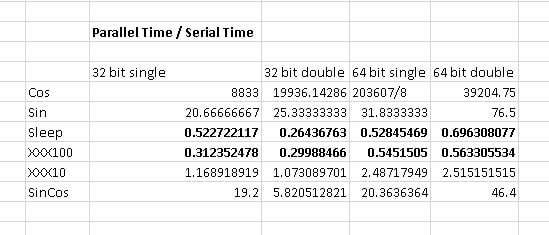
Performance comparison between Parallel.For and Serial version in Delphi 10 Seattle
For easy/trivial computation, the serial implementation may be a lot faster because the modern CPU may take advantage of the high-speed caching, prefetching etc.
Delphi / Object Pascal
- Delphi is 30 Years Old!
- Reviews of FixInsight - Delphi Static Code Analyser
- Lighting-fast Delphi 2007 Compiling Speed
- The Inline Keyword in Delphi
- Does Parallel.For in Delphi Actually Improve the Performance?
- Delphi TParallel Cleanup Needed
- Delphi Compiles Code to Linux 64-bit Server
- Integer Performance Comparisons of Delphi Win32, Win64 and Linux64 for Single/Multithreading Counting Prime Number
- How to Check If Running in 64-bit Windows Environment using Delphi?
- How to Check Debugger Present in Delphi?
- Delphi Static Code Analyser - FixInsight
- Optimal SizeOf Code Generated in Delphi 2007
–EOF (The Ultimate Computing & Technology Blog) —
910 wordsLast Post: Simple and Fast Hash Functions in Delphi
Next Post: Utilising The Best API for Your Niche