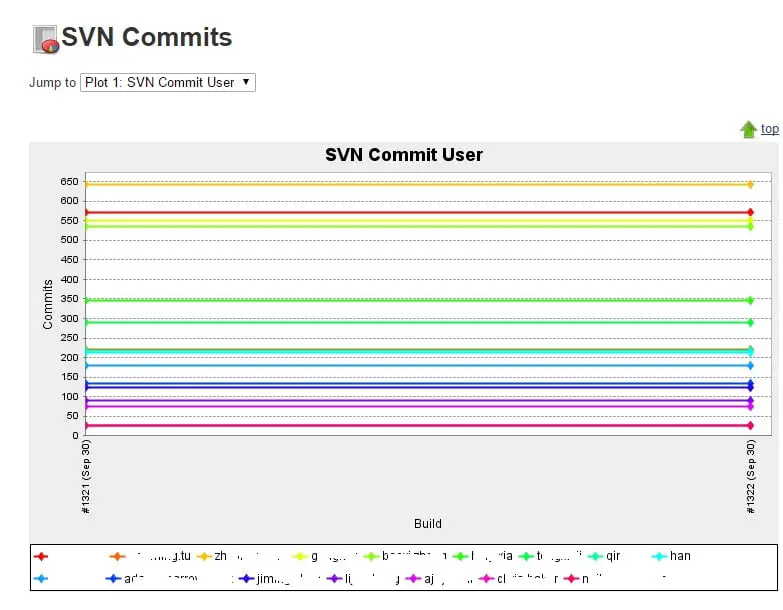
如果你是项目经理 或者是HR, 你一定想了解每个程序员的活动情况. 比如 哪个季节月份请假的人比较多 而或哪些人平时比较积极 哪些人比较偷懒等. 我们可以根据SVN提交的记录来画出每次时间点上 每个开发者的提交次数.
通过以下命令能获得SVN历史提交记录, 生成XML输出并且通过 GREP命令筛选出只含提交者的名字 (去掉多余的标记)
svn log -v --xml | grep "author.*/author"
使用POWERSHELL编译脚本中的DICTIONARY对象 统计每个程序员的提交次数 然后分别写入文件中. 再通过JENKINS的PLOT插件画出来即可.
<#
.DESCRIPTION
Count SVN Commits
#>

Task SVNLog {
    Set-Location "$WorkingCopyDir"
    $log = &svn log -v --xml | grep "author.*/author"
    $dict = @{}
    $logarr = $log -replace "<author>", "" -replace "</author>", " ".Trim().Split(" ") | ForEach-Object {
        $author = $_.Trim()
        if ($author.Length -gt 2) {
            if ($dict.ContainsKey($author)) {
                $cur = $dict[$author]
                $dict[$author] = $cur + 1
            } else {
                $dict[$author] = 1
            }
        }
    }
    Write-Host "***********************************Commits Statistics************************************"
    $dict.GetEnumerator() | Sort-Object Value -descending

    $total = 0

    foreach ($author in $dict.GetEnumerator()) {
        if ($author.Key -ne $null -and $author.Value -ne $null) {
            $file = $author.Key + ".svn.txt"
            Write-Host $file
            $filename = Join-Path "$SolutionDir" "$file"
            Write-Host $filename
            $total = $total + [convert]::ToInt32($author.Value, 10)
            Write-Host "$total"
            WritePropertyFile $filename $author.Value.ToString() "https://helloacm.com"
            Write-Host "$filename has been written."
        }
    }

    Write-Host "******TOTAL SVN COMMITS = $total ***********************"
    $filename = Join-Path "$SolutionDir" "svn.total.txt"
    WritePropertyFile $filename $total.ToString() "https://helloacm.com"
    Write-Host "$filename has been written."
}
画出来大概长这样子:

svn-plot-ci-server
强烈推荐
- 英国代购-畅购英伦
- TopCashBack 返现 (英国购物必备, 积少成多, 我2年来一共得了3000多英镑)
- Quidco 返现 (也是很不错的英国返现网站, 返现率高)
- 注册就送10美元, 免费使用2个月的 DigitalOcean 云主机(性价比超高, 每月只需5美元)
- 注册就送10美元, 免费使用4个月的 Vultr 云主机(性价比超高, 每月只需2.5美元)
- 注册就送10美元, 免费使用2个月的 阿里 云主机(性价比超高, 每月只需4.5美元)
- 注册就送20美元, 免费使用4个月的 Linode 云主机(性价比超高, 每月只需5美元) (折扣码: PodCastInit2022)
- PlusNet 英国光纤(超快, 超划算! 用户名 doctorlai)
- 刷了美国运通信用卡一年得到的积分 换了 485英镑
- 注册就送50英镑 – 英国最便宜最划算的电气提供商
- 能把比特币莱特币变现的银行卡! 不需要手续费就可以把虚拟货币法币兑换
微信公众号: 小赖子的英国生活和资讯 JustYYUK