这篇英文博文 https://helloacm.com/archives-of-pagesposts/ 介绍了如何显示历史发表的文章记录 我们接下来要做一个简单的图 用于显示每个月发表的文章数目 (如下). 文章存档 DEMO 在此.

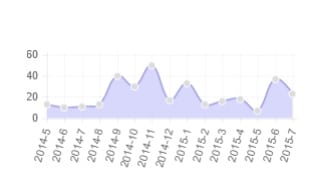
chart-posts-per-months-wordpress-php-js
也许这并没有什么卵用 但是我们大概可以看出一年内哪个月比较心情好 哪个月比较忙等等.
我们需要一个第三方的 JAVASCRIPT 库 用于在浏览器里画图 可以在 https://justyy.com/js/chart.js 下载. 在模板文件里最前面加入以下PHP代码即可.
  echo '<script language="Javascript" src="https://justyy.com/js/chart.js"></script>'."\n";
  global $wpdb; // helloacm.com

  // count the posts number group by each month
  $query = "
      select
        concat(year(`post_date`), '-', month(`post_date`)) as `month`,
        count(1) as `cnt`
      from
        `wp_posts`
      where
        (post_type='page' or post_type='post') and
        `post_status` = 'publish'
      group by
        `month`
      order by
        `post_date` desc
      limit
         12
";  // 默认统计 过去 12个月

  $result = array_reverse($wpdb->get_results($query));// 默认按时间顺序从左往右显示
  if ($result) {
?>

<div id='ReportBarChartContainerMonthly'>
    <div id='ReportBarChartComponentMonthly' style='margin: 15px;'>
        <canvas id="myChartMonthly" style='max-width:100%;height:auto'></canvas>
    </div>
</div>

<script language="Javascript">
    var data = {
        labels: [

            <?php
    foreach ($result as $month) {
      echo '"'.$month->month.'", ';
    }
            ?>
        ],
        datasets: [
            {
                label: "Number of Posts",
                fillColor: "rgba(200,200,250,0.7)",
                strokeColor: "rgba(150,150,220,1)",
                pointColor: "rgba(220,220,220,1)",
                pointStrokeColor: "#fff",
                pointHighlightFill: "#fff",
                pointHighlightStroke: "rgba(220,220,220,1)",
                data: [
            <?php
    foreach ($result as $month) {
      echo '"'.$month->cnt.'", ';
    }
            ?>
                ]
            }
        ]
    };

    var ctx = document.getElementById("myChartMonthly").getContext("2d");
    var myNewChart = new Chart(ctx).Line(data, {
        bezierCurve: true
    });
</script>
< ?php
  }
保存 并且 删除缓存 就可以显示出来了
需要注意的是: (1) SQL语句最后面 那个 LIMIT 12 就是统计月份数目 默认过去12个月 (2) array_reverse 是把结果从左往右按时间顺序 去除这个调用 就变成从右往左 (3) 如果WP的表不是以wp_开头则需要修改.
英文: https://helloacm.com/how-to-show-chart-statistics-of-monthly-number-of-posts-in-wordpress/
强烈推荐
- 英国代购-畅购英伦
- TopCashBack 返现 (英国购物必备, 积少成多, 我2年来一共得了3000多英镑)
- Quidco 返现 (也是很不错的英国返现网站, 返现率高)
- 注册就送10美元, 免费使用2个月的 DigitalOcean 云主机(性价比超高, 每月只需5美元)
- 注册就送10美元, 免费使用4个月的 Vultr 云主机(性价比超高, 每月只需2.5美元)
- 注册就送10美元, 免费使用2个月的 阿里 云主机(性价比超高, 每月只需4.5美元)
- 注册就送20美元, 免费使用4个月的 Linode 云主机(性价比超高, 每月只需5美元) (折扣码: PodCastInit2022)
- PlusNet 英国光纤(超快, 超划算! 用户名 doctorlai)
- 刷了美国运通信用卡一年得到的积分 换了 485英镑
- 注册就送50英镑 – 英国最便宜最划算的电气提供商
- 能把比特币莱特币变现的银行卡! 不需要手续费就可以把虚拟货币法币兑换
微信公众号: 小赖子的英国生活和资讯 JustYYUK