Sometimes, you want to invoke a messagebox dialog from the windows command line, and here is one that is written in Windows Batch.
@echo off
rem Example Msgbox "Hello World!"
rem https://helloacm.com/a-simple-msgbox-command-line-utility-in-windows-batch/

set TMPFILE="%~dp0%RANDOM%.vbs"
if not [%1]==[] (
	echo MsgBox %1 > %TMPFILE%
	"cscript.exe" //Nologo %TMPFILE%
	del /f %TMPFILE%
)
The idea is to write a simple statement in VBScript, which is written into a temporary VBS file. In essence, the following single line VBScript statement is executed using cscripe.exe (or wscript.exe), with //NoLogo parameter to suppress information print-out.
msgbox %1
The usage is to wrap the text in double quotes, like this:
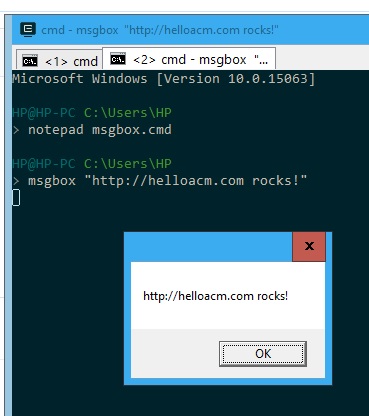
Msgbox in Windows Batch
–EOF (The Ultimate Computing & Technology Blog) —
231 wordsLast Post: LOGO Turtle Tutorial How to Draw Fractal Stars?
Next Post: C# When did you read the using directive section on the top of each file?
Thank you for the tips. I actually do not know if you can popup a message via a console.
🙂 It is amazing..