
Quick Comparisons between Linode and Vultr
Linode and Vultr are both cloud-hosting providers that specialize in virtual private servers (VPS).
Both companies offer servers with multiple locations around the world, as well as customizable plans that can be tailored to fit any budget. The main difference between Linode and Vultr is the type of pricing plans they offer.
Linode offers fixed-rate plans, with a minimum of $10/month for a single CPU core, 1GB of RAM, and 20GB of storage space. On the other hand, Vultr provides more flexible pay-as-you-go pricing plans, with a minimum of $2.50/hour for a single CPU core, 512MB of RAM,and 10GB of storage space.
Both companies offer similar features such as snapshots and backups, custom images, firewalls, DNS management options, IP address whitelisting etc., however Linode offers additional features such as block storage (which allows you to expand your storage space) and dedicated CPU cores (which provide more processing power).
Overall both providers offer very competitive services at reasonable prices but it really comes down to what kind of features you need for your application. If you’re looking for a low cost solution Vultr may be more suitable whereas if you need more advanced features then Linode may be the better option.
TLDR; My Experience of using Vultr and Linode Cloud
Recently Linode has started the basic $5 per month plan, which offers 1 core, 20GB SSD, 1TB Transfer with the 40Gbps In and 1000 MBps out. This article is not intended to say which is better but it gives a few facts based on my testings and experiments as of today.
Specs for Lowest VPS Node
For Vultr, the lowest is also $5 dollar and what you get is slightly different: 1 core, 15GB SSD, 1TB Monthly transfer. The RAM and SSD is slightly smaller than what Linode offers 1GB and 20GB respectively. The monthly bandwith is 1TB but Vultr does not say explicitly the transfer speed for In and Out. But that is ok, we can find out later (following speedtest).
The lowest VPS is good enough if you want to host a few less busy sites, do some projects or set up a VPN. In general, with the same price, Linode offers slightly more resources (majorly RAM and SSD) compared to Vultr.
PHP Speed Performance Comparison between Linode and Vultr
Based on the PHP script that computes the primes, we did a quick benchmark performance comparision between a Linode and Vultr $5 node. The difference is mainly due to the fact that Linode offers faster CPU Frequency.:
The following is the Vultr $5 1 node, 768 MB RAM:
# time php benchmark.php
18d4ca26855547425cd444aa4d036987
real    0m6.857s
user    0m3.088s
sys     0m2.140s
# time php benchmark.php
18d4ca26855547425cd444aa4d036987
real    0m4.936s
user    0m2.984s
sys     0m0.996s
# time php benchmark.php
18d4ca26855547425cd444aa4d036987
real    0m3.783s
user    0m2.900s
sys     0m0.700s
# time php benchmark.php
18d4ca26855547425cd444aa4d036987
real    0m3.789s
user    0m2.832s
sys     0m0.808s
and the following is the $5 Linode, 1GB RAM, 1 Node:
# time php benchmark.php
18d4ca26855547425cd444aa4d036987
real    0m3.552s
user    0m3.090s
sys     0m0.430s
# time php benchmark.php
18d4ca26855547425cd444aa4d036987
real    0m3.303s
user    0m2.947s
sys     0m0.303s
# time php benchmark.php
18d4ca26855547425cd444aa4d036987
real    0m3.355s
user    0m2.997s
sys     0m0.327s
# time php benchmark.php
18d4ca26855547425cd444aa4d036987
real    0m3.263s
user    0m2.940s
sys     0m0.303s
From the above 4 runs each, we can see that the Linode is slightly faster and it gives stable results each run. To see each core specs, we can run the command lscpu and here is for Vultr:
# lscpu
Architecture:          x86_64
CPU op-mode(s):        32-bit, 64-bit
Byte Order:            Little Endian
CPU(s):                1
On-line CPU(s) list:   0
Thread(s) per core:    1
Core(s) per socket:    1
Socket(s):             1
NUMA node(s):          1
Vendor ID:             GenuineIntel
CPU family:            6
Model:                 61
Model name:            Virtual CPU a7769a6388d5
Stepping:              2
CPU MHz:               2399.994
BogoMIPS:              4799.98
Hypervisor vendor:     KVM
Virtualization type:   full
L1d cache:             32K
L1i cache:             32K
L2 cache:              4096K
NUMA node0 CPU(s):     0
Flags:                 fpu vme de pse tsc msr pae mce cx8 apic sep mtrr pge mca cmov pat pse36 clflush mmx fxsr sse sse2 syscall nx rdtscp lm constant_tsc rep_good nopl eagerfpu pni pclmulqdq ssse3 fma cx16 pcid sse4_1 sse4_2 x2apic movbe popcnt tsc_deadline_timer aes xsave avx f16c rdrand hypervisor lahf_lm abm 3dnowprefetch fsgsbase bmi1 avx2 smep bmi2 erms invpcid rdseed adx xsaveopt arat
and here is the output for Linode:
# lscpu
Architecture:          x86_64
CPU op-mode(s):        32-bit, 64-bit
Byte Order:            Little Endian
CPU(s):                1
On-line CPU(s) list:   0
Thread(s) per core:    1
Core(s) per socket:    1
Socket(s):             1
NUMA node(s):          1
Vendor ID:             GenuineIntel
CPU family:            6
Model:                 62
Model name:            Intel(R) Xeon(R) CPU E5-2680 v2 @ 2.80GHz
Stepping:              4
CPU MHz:               2799.998
BogoMIPS:              5602.32
Hypervisor vendor:     KVM
Virtualization type:   full
L1d cache:             32K
L1i cache:             32K
L2 cache:              4096K
NUMA node0 CPU(s):     0
Flags:                 fpu vme de pse tsc msr pae mce cx8 apic sep mtrr pge mca                                                                                                                                                              cmov pat pse36 clflush mmx fxsr sse sse2 ss syscall nx pdpe1gb rdtscp lm constan                                                                                                                                                             t_tsc arch_perfmon rep_good nopl eagerfpu pni pclmulqdq ssse3 cx16 pcid sse4_1 s                                                                                                                                                             se4_2 x2apic popcnt tsc_deadline_timer aes xsave avx f16c rdrand hypervisor lahf                                                                                                                                                             _lm fsgsbase tsc_adjust smep erms xsaveopt arat
As we can see clearly, Linode offers faster CPU cores.
SSD Speed Comparison
Both Linode and Vultr offer SSD, so it should be fairly fast for both compared to traditional HDD servers. We use the following command to test the SSD speed.
It is also interesting that Linode allows a more flexible SSD management, e.g. you can allocate some quota first and save them for later use (via Create a new Disk from the remaining quota).
For Vultr:
Vultr:
# dd if=/dev/zero of=test bs=64k count=16k conv=fdatasync
16384+0 records in
16384+0 records out
1073741824 bytes (1.1 GB, 1.0 GiB) copied, 2.37668 s, 452 MB/s
# dd if=/dev/zero of=test bs=64k count=16k conv=fdatasync
16384+0 records in
16384+0 records out
1073741824 bytes (1.1 GB, 1.0 GiB) copied, 2.33516 s, 460 MB/s
# dd if=/dev/zero of=test bs=64k count=16k conv=fdatasync
16384+0 records in
16384+0 records out
1073741824 bytes (1.1 GB, 1.0 GiB) copied, 2.33622 s, 460 MB/s
For Linode:
# dd if=/dev/zero of=test bs=64k count=16k conv=fdatasync
16384+0 records in
16384+0 records out
1073741824 bytes (1.1 GB, 1.0 GiB) copied, 2.17379 s, 494 MB/s
# dd if=/dev/zero of=test bs=64k count=16k conv=fdatasync
16384+0 records in
16384+0 records out
1073741824 bytes (1.1 GB, 1.0 GiB) copied, 1.91743 s, 560 MB/s
# dd if=/dev/zero of=test bs=64k count=16k conv=fdatasync
16384+0 records in
16384+0 records out
1073741824 bytes (1.1 GB, 1.0 GiB) copied, 1.82777 s, 587 MB/s
Again, the Linode‘s SSD is slightly faster than Vultr.
SpeedTest-cli
We use the utility speedtest-cli to test the uplink and downlink speed from the Vultr and Linode servers. For Vultr:
# speedtest-cli
Retrieving speedtest.net configuration...
Retrieving speedtest.net server list...
Testing from Choopa
Selecting best server based on latency...
Hosted by MyRepublic (Singapore) [6.48 km]: 1.438 ms
Testing download speed........................................
Download: 2397.36 Mbit/s
Testing upload speed..................................................
Upload: 714.46 Mbit/s
For Linode:
# speedtest-cli
Retrieving speedtest.net configuration...
Testing from Linode
Retrieving speedtest.net server list...
Selecting best server based on ping...
Hosted by Tekify Broadband Internet Services (Fremont, CA) [2.14 km]: 1.084 ms
Testing download speed................................................................................
Download: 782.94 Mbit/s
Testing upload speed....................................................................................................
Upload: 392.55 Mbit/s
For this comparison, Vultr is better, if offers higher uplink and downlink speed (especially the uplink is important, which directly affects the website speed. However, this may diff from time to time and locations to locations.
To see the ping speed depending on locations, you can read this post.
Backups (Snapshots)
Vultr offers up to 15 free snapshots (for backup purposes) while Linode charges $2 per month for $5 instance. The snapshots can be taken while the system is running and 3 out of 4 snapshots provided ($2 per month) by Linode are taken automatically (rotation, a daily backup, a 2-7 day old backup, and an 8-14 day old backup. The last backup slot is a user snapshot and remains in place until another snapshot is taken manually).
Vultr offers automatical backups (snapshots), but it also comes with price e.g. $2 per month. A larger SSD generally costs more if you want to turn on automatic backups (snapshots).
Snapshots are very convenient if you want to deploy your current server in other location, so what you need to do is to take a snapshot and deploy to another location. For Linode, you can’t deploy a server instance using snapshots, but possibly you can do this via ‘Images *BETA*’ which is currently in beta.
UI Web Management
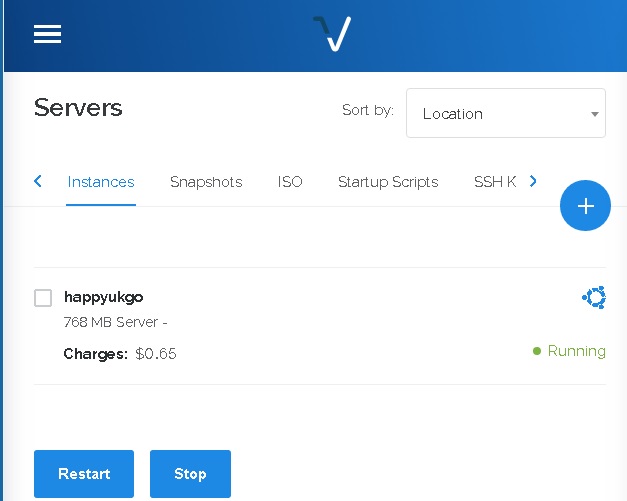
The Vultr‘s web management interface is simple but powerful. It is easy to use and more importantly, it is responsive design which means that you can totally manage your instances on small screens e.g. smart phones.
vultr-dashboard-mobile-user-friendly
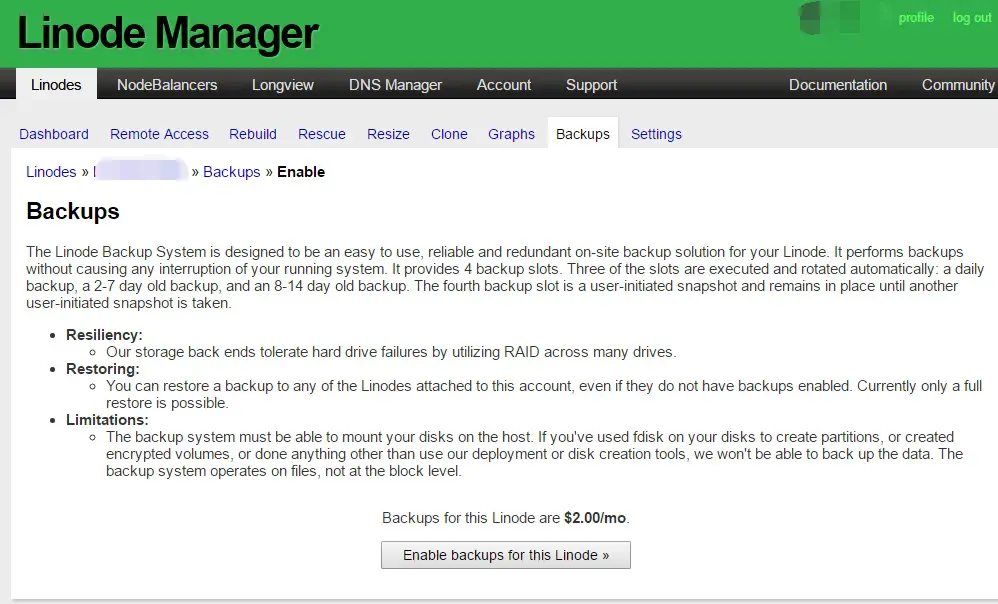
On the other hand, Linode web management interface looks a bit outdated but it has more functions than Vultr e.g. reseting the root password in case you forget.
linode-web-management-interface
Payment Methods Comparison
Vultr supports both credit card, bitcoin and paypal methods. Linode only supports credit card and Paypal (while you need to make payments to Linodeaccounts first).
Dedicated Instances
The Dedicated Instances (also known as Dedicated Servers) are for busy sites that do not want the noisy neighbours. Linode does not support deployment of Dedicated Instances while Vultr has this options for a few locations: e.g. Chicago, New York and Tokyo.
API and CLI
Both Vultr and Linode offers API. Vultr has only 1 maximum APP key at a time (you can regenerate). The security access is control by IP whitelist or blacklist.
For Linode, the API keys can be many. Each can specify the expiry date however there is no IP whitelist or blacklist.
Besides API, Linode has provided the CLI (Command Line Interface) which allows you to control your instances directly from your server prompt e.g. Ubuntu.
Hourly Billing
Both Linode and Vultr are billed hourly, which is convenient. You pay what you use, no hidden fees. However, you still need to pay for your power-off instances as they are still maintained. To avoid unwanted charges, you need to destroy instances when they are no longer needed.
Extra Bandwidth Charge
Linode charges $0.02 for each GB over the pooled network transfer quota (excluding inbound traffic, e.g. you upload files to your server).
Vultr charges different rate ($0.02 per GB in USA and Western Europe, while $0.05 per GB for Asian instances, $0.10 per GB for Australia). And the bandwidth is calculated as the highest of inbound traffic or outbound traffic.
Account Security
Both Linode and Vultr provides two-factor auth, which greatly enhances your account safety. Besides, Linode offers expiry settings for the password management.
IPv4 and IPv6
Both Linode and Vultr provides Linode while this function is easily accessible at Vultr‘s web management interface. Additional IPv4 costs e.g. $3 per month.
Affliate Comparisons
For Vultr, the earnings from your commissions can be paid out via Paypal while for Linode, the earnings can only be credited to your account (so you can spend it on VPS Instances later).
Use podcastinit2017 to get $20 For Free (so 4 months free give away) when you sign up with Linode.


linode-logo
Sign up via the following URL to get $20 For Free (so 4 months free give away) when you sign up with Vult

vultr cloud VPS
–EOF (The Ultimate Computing & Technology Blog) —
Last Post: Why and How to Turn Off Ping (ICMP) for Servers?
Next Post: How to Find Maximum Integer Products using Javascript?